
- 対応
- iOS

どんなアプリ?
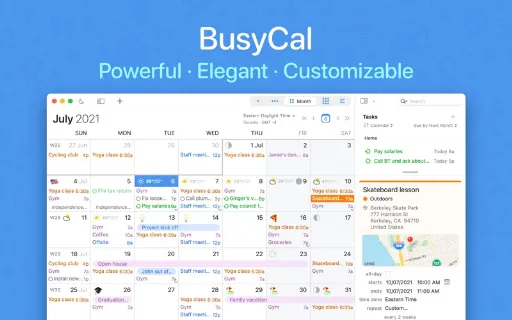
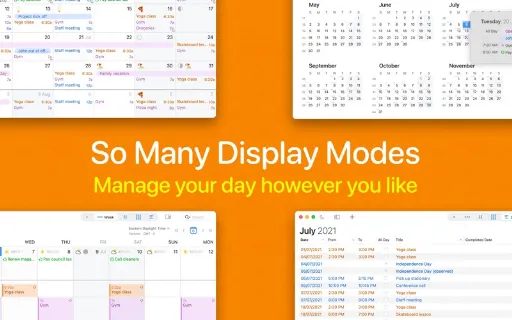
BusyCal はmacOSのための最も強力な、フレキシブルで信頼性の高いカレンダーアプリケーションです。カスタム可能な表示、To Doの統合、移動時間、マップ、自然な言語入力、天気、月相、グラフィックス、タグ等、画期的で時間節約の機能を満載しています。 カスタム可能な表示 BusyCalは日、週、月、年、およびリスト表示でカレンダーを表示できます。BusyCalが他とは違う点は、ニーズに合わせてこれらの表示をより正確にカスタムできるという点です。 月に表示する週数、週に表示する日数を選択できる他、フォントの書体とサイズ、カレンダーの色、時刻フォーマットなどを選択して、カレンダーのアピアランスをカスタムすることもできます。 To Doを統合
App Store の説明を全文読む
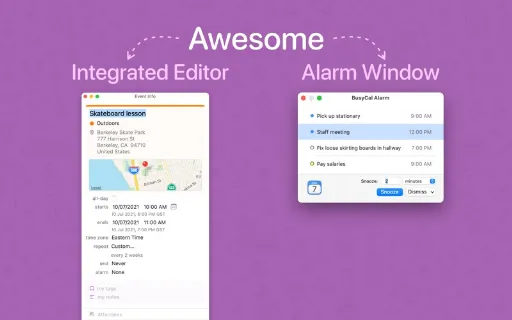
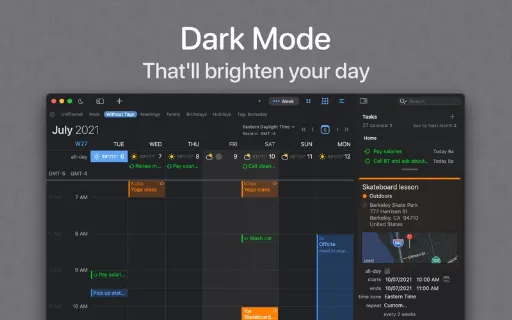
BusyCal はmacOSのための最も強力な、フレキシブルで信頼性の高いカレンダーアプリケーションです。カスタム可能な表示、To Doの統合、移動時間、マップ、自然な言語入力、天気、月相、グラフィックス、タグ等、画期的で時間節約の機能を満載しています。 カスタム可能な表示 BusyCalは日、週、月、年、およびリスト表示でカレンダーを表示できます。BusyCalが他とは違う点は、ニーズに合わせてこれらの表示をより正確にカスタムできるという点です。 月に表示する週数、週に表示する日数を選択できる他、フォントの書体とサイズ、カレンダーの色、時刻フォーマットなどを選択して、カレンダーのアピアランスをカスタムすることもできます。 To Doを統合 BusyCalではTo Doがカレンダーに統合されているので、期限の日付または時刻に表示され、完了するまで表示され続けます。サイドバーにTo Doリストを表示することもできます。BusyCalに入力されたTo Doは、MacとiOSのリマインダーApp同期されます。 情報パネル BusyCalの情報パネルからはイベントの詳細をすばやく正確に表示、編集できます。情報パネルはポップアップ、またはフローティングウインドウとしてサイドバーに表示できます。また、完全にカスタム可能です。時間帯、タグ、マップ、メモ、最終編集日時など、幅広い属性から表示したいものを選択できます。 移動時間 BusyCalは、徒歩、車、または公共交通機関を使ってイベントまたは場所に到着するための移動時間を確保しておくように設定することができます。一定の移動時間を指定することも、統合されている位置情報サービスとAppleのマップを使って自動的に計算することもできます。交通状況の変化に応じて出発時刻の通知を受け取ることもできます。 メニューバーApp BusyCalのメニューバーAppは、BusyCalのメインアプリケーションが実行されていない時でも常に実行中ですので、いつでもスケジュールにアクセスできます。メニューバーAppはミニ月表示、イベントとTo Doをスクロールできるリスト、天気予報を表示します。イベントをクリックすると、詳細が表示され、自然な言語を使って新規イベントとTo Doを作成できます。 天気 & 月相 BusyCalは、10日分のライブ天気予報と月の位相、日の出と日没の時刻を表示します。 グラフィックス BusyCalは祝日や特別なイベントをハイライトするためにカレンダーにグラフィックスを追加することができます。内蔵の絵文字やIconFinderのイメージから選択することもできますし、デスクトップまたはウェブからイメージをドラッグすることもできます。 スマートフィルタ BusyCalのスマートフィルタはカレンダー管理の強力なツールです。スマートフィルタにはキーボードショートカット、またはツールバー上のボタンからアクセスできます。スマートフィルタからは、カレンダーセット(複数のカレンダーを表示/隠す)の表示、保存した検索結果(例:“直人”を含むイベント)の実行、表示の設定の適用(例:月表示に8週間を表示)などを実行できます。 通知 BusyCalは移動可能な、サイズ変更ができるフローティングウインドウに通知を表示します。通知は“今すぐ”からイベントの開始前まで分単位でスヌーズすることができます。また、複数の通知を1度にスヌーズすることもできます。BusyCalの通知はBusyCalのメインアプリケーションが実行中でない時にも送信されますので、大切な約束を忘れることは2度となくなるでしょう。 BUSYCONTACTSとの統合 BusyCalは姉妹アプリケーション、BusyContactsと統合しているので、フレキシブルで使いやすいCRMソリューションを提供します。BusyCalのイベントに連絡先を追加することで、連絡先のメールアドレスや電話番号にすばやくアクセスできる上、連絡先との交流記録をBusyContactsに残すことができます。 カレンダーの同期と共有 BusyCalはiCloud、Google カレンダー、Exchange、Office 365、およびその他のCalDAVサーバを対象とした信頼性の高いサポートを提供しています。BusyCalを実行中の他のMacとiOSデバイス、または内蔵カレンダーAppと同期します。カレンダーの共有、会議のスケジュール、および他の人の空き状況を表示する機能が含まれています。

編集部 PICK UP
Nib
聞き取れるメモ帳。録音すると AI が議事録・要約・次の一手に整えてくれる。
情報
- バージョン
- 2026.3.1
- 最終更新
- 2026/08/04
- リリース
- 2016/11/21
- サイズ
- 64.1 MB
- 必要環境
- iOS 12.4 以降
- 対応端末
- Mac
- 対象年齢
- 4+
- 対応言語
- 日本語、NL、英語、フランス語 ほか6言語
最新バージョンの更新内容
· [NEW] Powerful new Find and Replace dialog · [NEW] Reimagined, redesigned and improved Availability Viewer for ease of use, better clarity and enhanced functionality. · [NEW] New natural language support for creating recurring events from phrases like every day, every month, or every year · [NEW] Added Natural Language support in Quick Entry for Japanese · [NEW] The Dock icon now supports Clear and Default Icon & Widget System styles in both Light and Dark Mode (See System Settings Appearance Icon & Widget Style) · [NEW] New and improved in-app updater. BusyCal no longer uses Package Installer for updates, making the update process faster and smoother · [NEW] Reminders syncing now syncs only the last 12 months of completed tasks to improve sync performance. Older completed tasks remain available in the Reminders app · Keyboard shortcuts added to Date Picker for common dates such as Today, Tomorrow and Next Week · Improved CalDAV sync to detect and apply account setting changes made after the initial sync · Improvements to Outlook sync when syncing with Microsoft Todo Lists · Improved date picker suggestions, entering 1d now offers In 1 day above other suggestions · Info panel scrollbars now appear automatically when the mouse is over the scroll track area. Helps when using wacom tablets · Improved to Simplified Chinese localization · Improved detection of Teams meeting support in Microsoft Office accounts · Fixed an issue where accepted Microsoft 365 meeting invitations could remain marked as Tentative in BusyCal · Fixed an issue where changing the end time of a multi-day timed event would also shift the end-date · Fixed Move to Time Zone not preserving an event's actual moment in time and sometimes collapsing its duration · Fixed a window activation issue with detached Info Panels, where clicking on the Title field would not immediately activate the window · Fixed a bug in Day view where using keyboard navigation to move to the previous day would require two keystrokes · Fixed a bug in Day view where the CMD+N shortcut would use the current date instead of the date of the selected day when a default time was set · Fixed a bug where the Alarm window would inadvertently dismiss snoozes as expired after a few hours · Fixed a bug where the Menu app could at times hang immediately after a restart · Fixed a bug where weather would not refresh after a day if the time zone changed · Fixed a bug where a deleted tag would resurrect briefly during sync, causing an unnecessary disruptive UI refresh · Fixed a bug where location services would cause the app to hang during launch at times · Moving an all-day event to a specific time now correctly updates the event with a default alarm, when configured · Fixed a bug where a blocking event on a Microsoft Graph calendar would at times replicate itself after sync · Fixed an issue with Microsoft Graph task time zone handling when mailbox settings could not be retrieved · Fix detached info panel date insertion · Ongoing stability and performance enhancements