
- 対応
- iOS
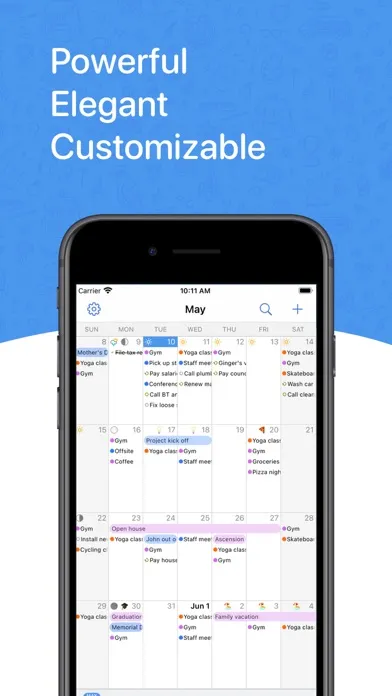
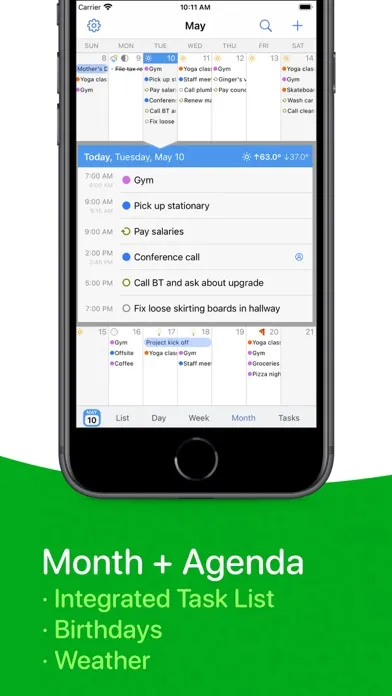
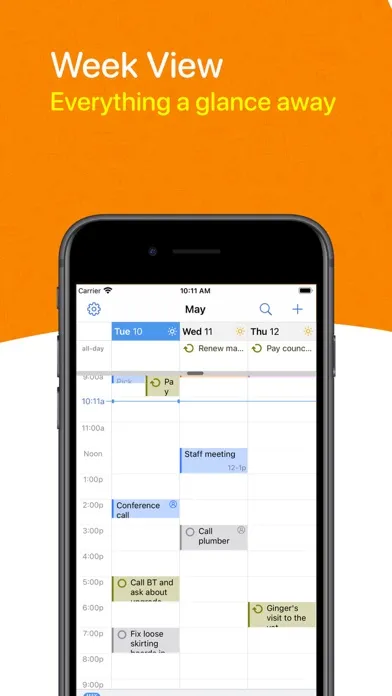
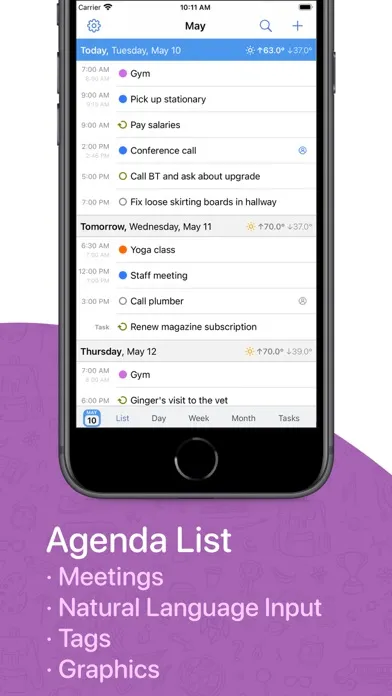
どんなアプリ?
BusyCalは、忙しいスケジュール、イベント、やることリストを管理するための強力かつ柔軟なカレンダーアプリです。 BusyCalのユニークな機能には、カスタマイズ可能なカレンダービュー、やることリストの統合、会議のスケジュール、移動時間、マップの統合、音声入力、タグ、アラーム、検索、天気、月相、誕生日、記念日、グラフィックスなどがあります。 BusyCalは、iCloud、Googleカレンダー、Exchange、Office 365、およびその他のCalDAVサーバーに対し信頼性の高いサポートを提供しているので、BusyCalを使用すると、BusyCalまたは組み込みのカレンダーアプリを実行している他のMacおよびiOSデバイスとカレンダーを同期および共有できるようになります。
App Store の説明を全文読む
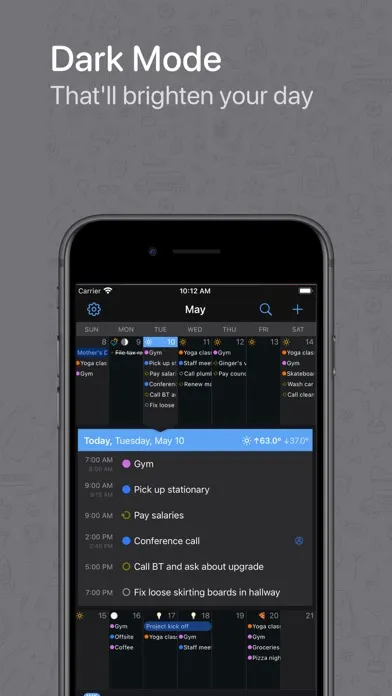
BusyCalは、忙しいスケジュール、イベント、やることリストを管理するための強力かつ柔軟なカレンダーアプリです。 BusyCalのユニークな機能には、カスタマイズ可能なカレンダービュー、やることリストの統合、会議のスケジュール、移動時間、マップの統合、音声入力、タグ、アラーム、検索、天気、月相、誕生日、記念日、グラフィックスなどがあります。 BusyCalは、iCloud、Googleカレンダー、Exchange、Office 365、およびその他のCalDAVサーバーに対し信頼性の高いサポートを提供しているので、BusyCalを使用すると、BusyCalまたは組み込みのカレンダーアプリを実行している他のMacおよびiOSデバイスとカレンダーを同期および共有できるようになります。 BusyCal for iOSは、BusyCal for macOSの機能満載のモバイルコンパニオンです。BusyCal for macOSは、長年にわたって、何千人ものユーザーに信頼され、頼っていただいたmacOS向け屈指のカレンダーソリューションです。 カレンダービュー • 月、週、日、またはリスト別にカレンダーを表示。 • ピンチおよびズームで、1ヶ月に表示される週数、および1週間に表示される日数を変更。 • カレンダーの色、天気、月相、誕生日、記念日、イベント時間、何週目かの表示など、カレンダーの外観をカスタマイズ。 パスワード保護 • 選択したカレンダーセット、またはすべてのカレンダーセットをロックするオプションにより、プライバシーが強化されます イベント • イベントを手動で作成したり、音声入力を使用して自動的に作成したりできます。 • 移動時間、タイムゾーン、出席者、連絡先、タグ、地図、最終編集時間など、イベントを表示または編集するときに表示するさまざまな属性から選択できます。 • プロジェクトや重要なイベントを追跡するために、イベントにタグを追加できます。 やることリスト • やることリストはカレンダーに直接表示され、完了するまで繰り越されます。 • やることリストは、日付をなしにしたり、特定の日時を指定したりすることができます。 • やることリストは、毎日、毎週、毎月など繰り返すようにスケジュールできます。 • やることリストは、日付、優先度、カレンダー、またはタイトルで並べ替えてフィルタリングできます。 移動時間、場所、地図 • 位置情報サービスをサポートーしているため、イベントに場所を追加できます。 • 道順はAppleマップとGoogleマップの両方をサポートしています。 • 移動時間を設定することで、行き先までの移動時間を予定に組み込めます。 • アラームを使用することで、移動時間の前に通知できます。 パーソナライズ • 誕生日と記念日を表示します。これには、何歳の誕生日かや何回目の記念日かが含まれます。 • リアルタイムの10日間の天気予報を表示。 • 月相を表示。 • BusyCal for macOSで作成されたグラフィックスを表示。 カレンダーの同期と共有 • カレンダーをiCloud、Googleカレンダー、Exchange、Office 365、Fruux、Yahoo、Kerio、Zimbra、OS X Server、SabreDAV、およびその他のCalDAVサーバーと同期および共有。 • BusyCalまたは組み込みのカレンダーアプリを実行している他のMacおよびiOSデバイスと同期。 その他の特徴 • ダークモード • 共有カレンダーの会議およびイベントの変更に関する通知を受信。 • カレンダーで過去や今後のイベント、やることリストを検索。 • イベントややることリスト、アラームには、デフォルト値を設定できます。

編集部 PICK UP
Nib
聞き取れるメモ帳。録音すると AI が議事録・要約・次の一手に整えてくれる。
人気の推移
App Store(日本)の公式ランキングと評価数を APPBASE が毎日記録しています。
- 仕事効率化・有料 最高8位 (8/28)
| 日付 | 仕事効率化・有料 |
|---|---|
| 8/28 | 8位 |
| 8/27 | 56位 |
| 8/26 | 25位 |
| 8/25 | 58位 |
| 8/24 | 25位 |
| 8/23 | 84位 |
| 8/22 | 67位 |
| 8/21 | 40位 |
| 8/20 | 11位 |
| 8/19 | 11位 |
| 8/18 | 99位 |
| 8/17 | 74位 |
| 8/16 | 45位 |
| 8/15 | 19位 |
評価数の推移
現在 222 件 (8/21から +1 件)
数値で見る
| 日付 | 評価数 |
|---|---|
| 2026/9/19 | 222件 |
| 2026/8/21 | 221件 |
App Store のレビュー
App Store に投稿された実際のユーザーレビューです(公式フィードから自動取得・最新順)。
-
★★★★★ Tasks are registered twice.
When you register a task from your iPhone or iPad, the same task will be registered twice. I ask for improvement.
のりぞ〜 ・ 2026年4月23日 ・ v6.5.92
-
★★★★★ 全体的にデザインが美しく、使いやすい
- 全体的にデザインが美しく、使いやすい - 特にウィジェットは大変素晴らしい、ウィジェットのために利用してもいいくらい - 今後メイン利用していきたい - ただ、以前メイン利用していたfirstseedカレンダーに比べて、不便なところもあるのでどちらも利用する 要望 - 複数イベント・タスクをまとめて一括でドラッグ&ドロップ。この機能がないことは大きなデメリット - ドラッグ中にカレンダーが固定されるので、スクロールした...
tientien20 ・ 2026年4月19日 ・ v6.5.92
-
★★★★★ 1週間ごとでスライドする機能がほしい
最高なカレンダーアプリです。15年前に購入して少し使ってからやめたけど、15年ぶりに再度使ったら劇的な進化を遂げています! 要望)weekビューの時、次へスライドすると、1日ずつしか移動しないのはストレス、できれば1週間ずつスライドできるようにしていただきたい(Mac版の >> のような機能です) よろしくお願いいたします。
DavidWu ・ 2025年11月14日 ・ v6.3.3
-
★★★★★ 色が変えられない
カレンダーに設定した色通りにならない。勝手に淡い色にしないでほしい
ねこねこくん ・ 2024年12月29日 ・ v5.3.77
-
★★★★★ かなりいいだけに改善を望む
iPhone, iPadでGoogleカレンダー連携にて使っていますがタッチパネルのスワイプにより週表示の日数を即座に変えることができるのが便利です。 Macでも使っていて、ウィークリーは最大2週間まで表示できますが、 iPhone,iPadでは最大1週間です。iPadを横長で使用するときにMacと同じように2週間表示ができて欲しい。 また、Split Viewでマンスリーとウィークリーを同時表示させたいのですが、アプリの多重起動に対応していないた...
tbden ・ 2024年10月21日 ・ v5.2.10
-
★★★★★ このアプリはMac名作の子孫・・
MacOS8, 9の時にnow up to dateというカレンダーソフトを使っていたのだけど、最大の特徴はタスクとイベントを一枚のカレンダーの中に書き込む事。このbusyCalも同じ。日々の活動記録が一枚の中に残るのが手帳としてありがたい。手元のスケジューラー、ジャーナルとして優秀だと思う。Mac用のbusyCalと連携してプリントアウトしてたのだが、データ保存量も膨大になってきて、かえってアプリの検索を駆使した方が便利になって来た。...
ニックネーム適当。 ・ 2024年7月19日 ・ v5.0.8
レビューの続きは App Store で読めます。
情報
- バージョン
- 6.7.5
- 最終更新
- 2026/09/14
- リリース
- 2016/06/22
- サイズ
- 121.8 MB
- 必要環境
- iOS 18.0 以降
- 対応端末
- iPhone、iPad
- 対象年齢
- 4+
- 対応言語
- 日本語、NL、英語、フランス語 ほか7言語
最新バージョンの更新内容
· [NEW] Siri AI and Shortcuts related improvements and additions · [NEW] Added support for Google Calendar’s expanded palette and custom event colors · [NEW] New option in Settings New Event Defaults to choose whether tapping the + button creates an event or a task, instead of the automatic default · [NEW] Add guests to Google meetings you've been invited to, when the organizer allows it · [NEW] New Year Planner option to align weekdays across months, wall-planner style. Rotate to landscape to see Year View option · [NEW] New and improved settings screen · [NEW] Redesigned first-run setup, making it quicker to add your accounts when you start out · [NEW] New option to reorder accounts from Settings, so calendars from one account can be listed above another · [NEW] Rearrange calendars and accounts directly from a Calendar Set's edit screen, with a Sort Alphabetically option for each account · [NEW] New setting to choose how phone numbers in event notes are called, including FaceTime, WhatsApp, Google Voice and Zoom · [NEW] New Remove Blocking command in the Block on Calendar menu, which now also checkmarks the calendars an event is already blocked on · [NEW] New Include All-Day Tasks setting to show or hide all-day tasks in the calendar · [NEW] Hide tasks assigned to others setting for Todoist accounts · [NEW] Added Russian localization · Improved overall reliability of Google Calendar syncing for meetings, RSVPs, and shared calendars · Improvements to the lock feature; you can now lock and unlock BusyCal with your device passcode when Face ID is not available · Calendar sorting within the Task List now uses the same calendar order visible in Settings Account Calendars. Calendars can be sorted alphabetically from the same settings screen · WebDAV Calendar Titles are now visible in the main Accounts screen · Improved calendar imports to better handle invalid .ics files · Improved location searches for places outside your current area · Optimizations to launch times and memory usage · Improved handling of meeting responses on Office 365 accounts · Smoother scrolling in Month view, including days with event graphics · Export to CSV now has a Select All option · Fixed the calendar landing on the wrong date when opening the app or switching between views · Fixed Google Tasks not moving to their new list in BusyCal when moved in Google · Fixed meeting invitations on Microsoft 365 and Outlook accounts not appearing in the Inbox when the invite was sent to a group or distribution list · Fixed an issue where temperatures could appear on the wrong date · Fixed the forecast not appearing until the app was reopened after allowing access to your location · Ongoing stability and performance enhancements