- 対応
- iOS
どんなアプリ?
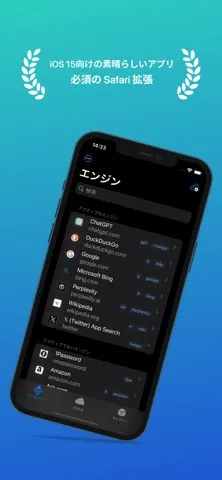
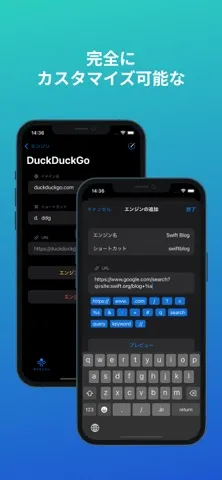
# 63の国と地域のApp Storeで特集されました SafariブラウジングをxSearchでアップグレードしましょう。iOS、iPadOS、macOSに対応したオールインワン検索ツールが1回の購入で利用できます。 xSearchを使えば、複数の検索エンジンを即座に切り替えたり、Spotlightから直接検索したりできるため、ブラウジングがより速く、より効率的になります。 たとえば、「g apple」と入力してGoogleで「apple」を検索したり、「ddg apple」と入力してDuckDuckGoで検索したりできます。
App Store の説明を全文読む
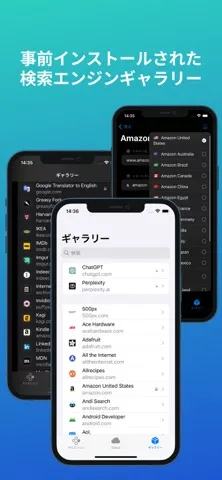
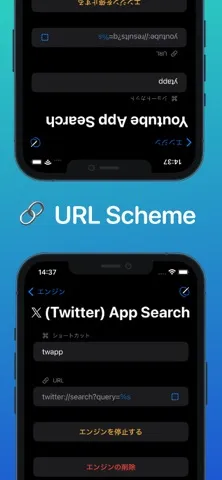
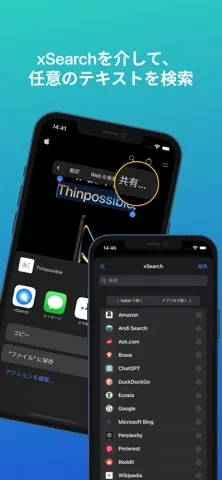
# 63の国と地域のApp Storeで特集されました SafariブラウジングをxSearchでアップグレードしましょう。iOS、iPadOS、macOSに対応したオールインワン検索ツールが1回の購入で利用できます。 xSearchを使えば、複数の検索エンジンを即座に切り替えたり、Spotlightから直接検索したりできるため、ブラウジングがより速く、より効率的になります。 たとえば、「g apple」と入力してGoogleで「apple」を検索したり、「ddg apple」と入力してDuckDuckGoで検索したりできます。 プライバシーは最優先事項です。xSearchは必要な権限のみを要求します。iOS 17、iPadOS 17、macOS 14以降では、Safari内で適切に機能するためにブラウジング履歴の表示権限が必要ですが、検索エンジンを識別するために現在のセッションのURLにのみアクセスします。すべての処理はローカルで行われ、個人情報がデバイスから漏洩することはないため、プライバシーは完全に保護されます。 _xSearchの主な機能の一部は次のとおりです。_ ■ ショートカットを使用して検索エンジンをすばやく切り替えます。 ■ URLスキームを使用して、X(Twitter)などの他のアプリ内を検索します。 ■ Safariのデフォルトの検索エンジンをxSearchのさまざまなエンジンでカスタマイズします。 ■ マルチ検索機能により、1つのショートカットで複数のエンジンを同時に検索できます。 ■ マルチ検索のランダムモードでは、検索中にシステムが自動的にエンジンを選択します。 ■ 最後の検索トークンは以前のクエリを記憶しているため、再入力せずにすぐに再利用できます。 ■ ショートカットとの統合により、どこからでもxSearchに便利にアクセスできます。 ■ 共有拡張機能を使用して、xSearchであらゆるアプリのあらゆるテキストを検索します。 ■ iCloudを使用して、すべてのデバイスで検索エンジンを同期します。 ■ JSONファイルのエクスポートおよびインポート機能を使用して、検索エンジンをバックアップおよび共有します。 ------------------------------ # Featured in the App Store across 63 countries & regions # Featured on Dailytekk's YouTube channel: "BEST iPad Browser Extensions (Apps)" # Featured on Christopher Lawley's YouTube channel: "Must Have Safari Extension for iOS/iPadOS 15" # Featured on MacStories's YouTube channel: "Safari Extensions for iPhone and iPad" Upgrade your Safari browsing with xSearch, the all-in-one search tool for iOS, iPadOS, and macOS with just one purchase. xSearch lets you instantly switch between multiple search engines and even search directly from Spotlight, making your browsing faster and more efficient. For example, type "g apple" to search for "apple" using Google, or "ddg apple" to search with DuckDuckGo. Privacy is a top priority: xSearch requests only the permissions it needs. On iOS 17, iPadOS 17, macOS 14 and later, it requires permission to view browsing history to function properly within Safari, but it only accesses the current session's URL to identify the search engine. All processing is done locally, and your personal information never leaves your device, ensuring your privacy is fully protected. Some of xSearch's key features include: ■ Quickly switch between search engines using shortcuts. ■ Use URL Scheme to search within other apps, such as X (Twitter). ■ Customize Safari's default search engine with xSearch's variety of engines. ■ Multisearch capability enables simultaneous searching across multiple engines with a single shortcut. ■ Random mode in multisearch allows the system to automatically select an engine for you during searches. ■ Last Search Token remembers your previous query, letting you reuse it instantly without retyping. ■ Integration with Shortcuts provides convenient access to xSearch from anywhere. ■ Use the share extension to search any text in any app with xSearch. ■ Synchronize your search engines across all your devices with iCloud. ■ Backup and share your search engines using the export and import JSON file feature.

編集部 PICK UP
Nib
聞き取れるメモ帳。録音すると AI が議事録・要約・次の一手に整えてくれる。
人気の推移
App Store(日本)の公式ランキングと評価数を APPBASE が毎日記録しています。
- 仕事効率化・有料 最高28位 (8/17)
| 日付 | 仕事効率化・有料 |
|---|---|
| 8/19 | 85位 |
| 8/18 | 52位 |
| 8/17 | 28位 |
| 8/16 | 98位 |
| 8/15 | 76位 |
| 8/14 | 58位 |
情報
- バージョン
- 4.1.3
- 最終更新
- 2026/07/03
- リリース
- 2021/09/20
- サイズ
- 16.5 MB
- 必要環境
- iOS 15.0 以降
- 対応端末
- iPhone、iPad
- 対象年齢
- 17+
- 対応言語
- 日本語、英語、ドイツ語、イタリア語 ほか6言語
対象年齢 17+ の理由
- 無制限のWebアクセス
最新バージョンの更新内容
- GoogleのリダイレクトURL(Gmail内のリンクなど)が誤って検索クエリとして処理される問題を修正しました。 - 一般的なバグ修正と安定性の向上。