

Valence 3D
Hi-Rez, LLC
App Store 評価: ★ 4.1 (49件)
- 対応
- iOS
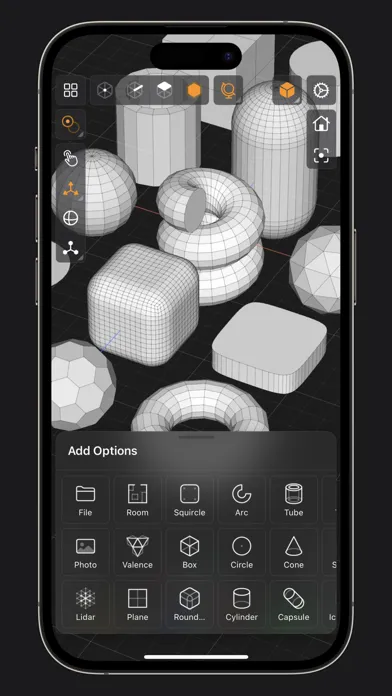
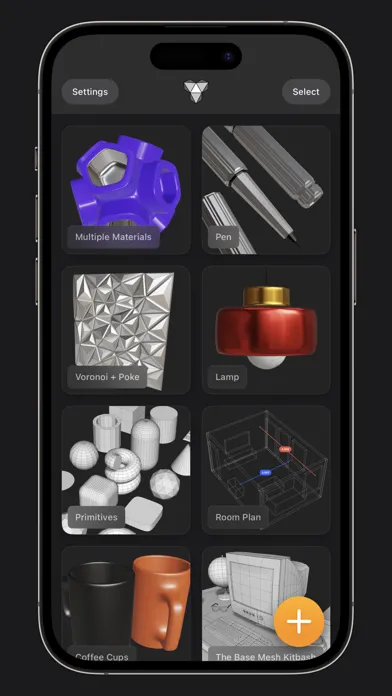
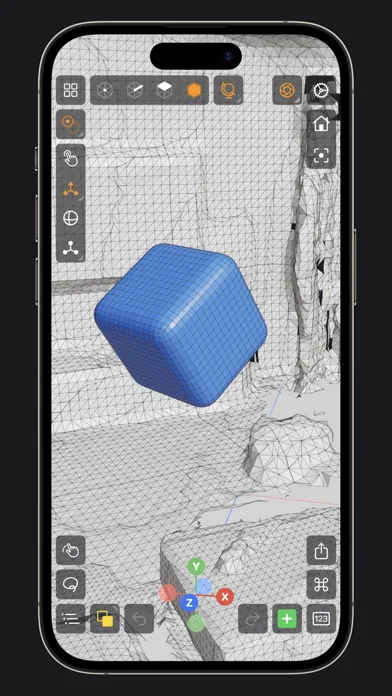
どんなアプリ?
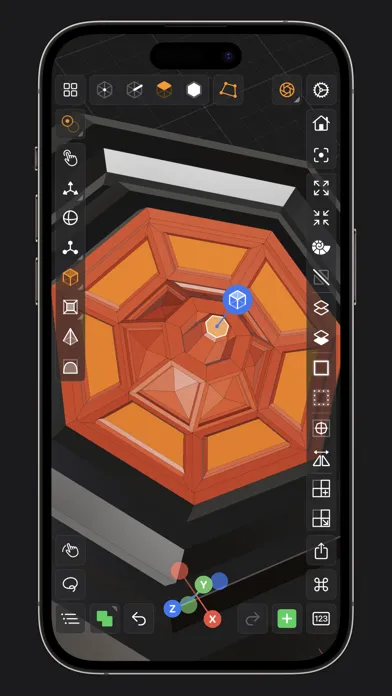
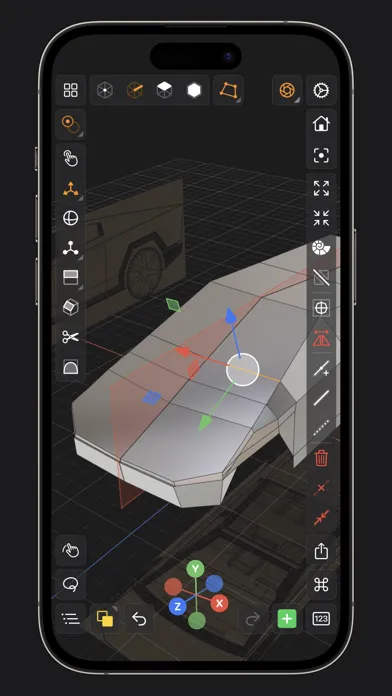
Valence 3D is a new powerful, beautiful & easy-to-use 3D modeler & design tool built from the ground up for iPad & iPhone. No matter whether you're learning 3D modeling for the first time or a professional working in design, construction, gaming, web dev, digital fabrication, architecture, or spatial computing, Valence 3D has what you need to get started! CREATE, IMPORT, EDIT & EXPORT 3D MODELS
App Store の説明を全文読む
Valence 3D is a powerful, beautiful, minimal, and easy-to-use 3D Polygon & SubD modeling app for iPad & iPhone. No matter whether you're learning 3D modeling for the first time or a professional working in design, construction, gaming, web dev, digital fabrication, architecture, or spatial computing, Valence 3D has what you need to get started! CREATE, IMPORT, EDIT & EXPORT 3D MODELS • 25 primitive shapes are built-in & ready to help you start modeling: plane, box, sphere, squircle, rounded box, arc, circle, cylinder, tube, cone, capsule, torus, icosphere, pipe, revolve, helix, voronoi, text, super shape, noise surfaces, torus knot, faceted gem & tube. • Import existing models, reference images, lidar scans and room plans • Imports: OBJ, STL, USD, USDZ • Exports: PNG, SVG, OBJ, STL, USD, USDZ, GLTF, GLB • Knife tool to create complex and detailed geometry • Move, Rotate, & Scale gizmos make it easy to transform nodes, faces, edges & vertices • Powerful modeling gizmos for extruding, insetting, beveling, poking, creasing & cutting • Multiple selection & automatic loop selection help accelerate your modeling • Tap on one of the gizmo handles to bring up an input field for precise transformations & mesh operations • Robust snapping & alignment commands • Selection operations: grow, shrink, select shell & deselect • Mesh operations: duplicate, instance, set / center pivot, trim by plane, boolean, apply transform & subdivide • Face operations: separate, combine, bridge, extract, poke, collapse, delete, dissolve, harden & soften • Edge operations: extrude, insert vertex, collapse, dissolve, bridge, harden & soften • Vertex operations: insert edge, dissolve, delete & merge • Non-destructive & configurable mesh modifiers: mirror & subdivision • Apply complex transformations using different gizmo pivot points & orientations EASILY NAVIGATE & STAY IN FLOW WHILE DESIGNING • Carefully crafted & fully optimized for iPhone & iPad • Designed to minimize cognitive overload by only showing tools & commands that are contextually relevant • Easily navigate to any part of your model by dragging and pinching: two finger pinch to zoom and roll, and one finger drag to rotate • Pop into the standard orthographic views by tapping one of the handles of the orientation gizmo • Use two & three finger tap gestures to undo & redo • Select components by dragging or using the rectangular selection mode • Your work is saved automatically every two minutes and every time you go back to the gallery • Get an overview of your scene’s structure from the Outliner • Long press on a node in the Outliner to easily rename, duplicate, instance, delete, parent & reorder any object in your scene • Precisely adjust any node’s position, rotation & scale with the Inspector • Adjust material properties, display & modifier options with the Inspector STAY ORGANIZED ACROSS ALL YOUR DEVICES • Preview, share, duplicate, delete & rename your models from the gallery • iCloud syncing keeps all your models up to date, private & accessible across all your devices PREVIEW, MEASURE, & RENDER YOUR CREATIONS • 6 powerful rendering modes: Matcap, Modeling, Wireframe, Physically Based, X-Ray & Path Traced • Export renders in any aspect ratio & scale • Preview your model in AR in two taps • Export your scene as a USDZ & be confident it’ll look consistent on all Apple devices • Tweak your model’s material & see changes in real-time • Tweak-able scene settings: camera field of view, background type, blurriness, intensity & rotation • Get model measurements in one click • Add persistent dimensions between any two surfaces in your scene PURCHASE & COMPATIBILITY • One time purchase unlocks both iPhone & iPad versions • Apple Pencil supported on select iPads • 120 FPS supported on devices with ProMotion displays • Path Tracing is supported on iPads with M series chips & iPhones with A15 Bionic & later • Lidar Scan & Room Plan is supported on devices with a lidar sensor

編集部 PICK UP
Nib
聞き取れるメモ帳。録音すると AI が議事録・要約・次の一手に整えてくれる。
人気の推移
App Store(日本)の公式ランキングと評価数を APPBASE が毎日記録しています。
- グラフィック/デザイン・有料 最高28位 (8/4)
| 日付 | グラフィック/デザイン・有料 |
|---|---|
| 8/28 | 33位 |
| 8/27 | 33位 |
| 8/26 | 33位 |
| 8/25 | 35位 |
| 8/24 | 36位 |
| 8/23 | 38位 |
| 8/22 | 36位 |
| 8/21 | 37位 |
| 8/20 | 37位 |
| 8/19 | 36位 |
| 8/18 | 34位 |
| 8/17 | 31位 |
| 8/16 | 32位 |
| 8/15 | 31位 |
評価数の推移
現在 49 件 (7/31から +1 件)
数値で見る
| 日付 | 評価数 |
|---|---|
| 2026/10/23 | 49件 |
| 2026/7/31 | 48件 |
App Store のレビュー
App Store に投稿された実際のユーザーレビューです(公式フィードから自動取得・最新順)。
-
★★★★★ インスタンス結合時の不具合
複数のインスタンスを結合しようとする際に結合中のダイアログが永遠にループされる。処理をキャンセルすると当該インスタンスの結合が出来なくなる。
不慣れマン ・ 2026年1月21日 ・ v1.3.9
-
★★★★★ Knife toolが欲しい!
アプリはちゃんと起動して操作性も慣れれば全然okなのですが、エッジループはあるのですがナイフツールが無い?見つけてないだけかもしれませんが、よく使うツールなので無ければ追加していただけるとありがたいです:]
FFの恐ろしさ ・ 2024年8月27日 ・ v1.2.0
-
★★★★★ 2回目以降も無事起動しました。
iPad Pro 3世代で起動しましたが、特に重たさを感じることもなく使えます。 モデリングに関しては私自身が初心者なので使い勝手の良さなどは正しく評価はできないと思いますが悪くないと思います。 レビューに書かれている2回目以降の起動に関しての問題も現時点の私の環境では起きていないので安心しています。 家の外でもモデリングの基本的な練習ができる上、買い切りで一度買ってしまえば以降は余計なことを気にせず使えるので...
Thyna10 ・ 2024年6月2日 ・ v1.1.3
-
★★★★★ まだまだ操作性に難あり?
辺を一周選択しようとするが選択出来る時と出来ない時の違いが良く分からない。 明確な操作ミスが分かれば対処のしようもありそうだけど、操作していて違いに気がつけない。 選択箇所が多いと、レントゲンで表示されてしまい誤った選択を誘発する。 色々と工夫を凝らしているがipadの限界を感じる。 使い方などまだあまりネット上にも少ないので、ユーザー数が増える事とこんな使い方があるなどこれから情報が増えていく事に...
yasu_210 ・ 2024年5月28日 ・ v1.1.3
-
★★★★★ Not Ready
Still a long way off from being ready for public use and for charging for this app. Still frustrating and useless. Looking forward to improvements and it being usable.
Tokyokid19 ・ 2024年5月22日 ・ v1.1.2
-
★★★★★ 起動しなくなる現象について
確かに起動2回目から開かなくなりました。 ただ、iCloudのバックアップ項目からこのアプリを外したら開くようになりました! (xのどなたかのコメントにあったので試してみました) アップデートされるまではこの方法がよいかと。
さすらいラーメン ・ 2024年4月27日 ・ v1.0.8
レビューの続きは App Store で読めます。
情報
- バージョン
- 1.4.7
- 最終更新
- 2026/10/04
- リリース
- 2024/03/14
- サイズ
- 196.1 MB
- 必要環境
- iOS 18.0 以降
- 対応端末
- iPhone、iPad
- 対象年齢
- 4+
- 対応言語
- 日本語、DA、英語、フランス語 ほか9言語
最新バージョンの更新内容
Minor bug fixes.