- 対応
- iOS

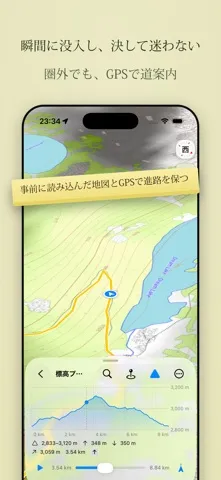
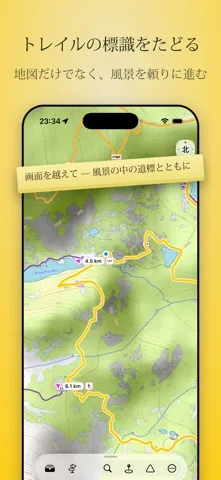
どんなアプリ?
** ダウンロード後、14日間の無料トライアルをご利用いただけます ** — 一番小さなトレイル、最大の冒険。 — そのランニングコースがどれくらいの距離なのか知りたいと思ったことはありませんか?サイクリングツアーを計画していますか?またはマラソンに向けてトレーニング中で、長距離ランのコースをどこにすればよいか迷っていますか?それとも、1000カロリーを消費するにはどれくらい走ればよいのか知りたいですか?そんなあなたにぴったりなのが、ルート計画アプリ「TrailRunner mini」です。 — 踏み慣れた道から外れて。 —
App Store の説明を全文読む
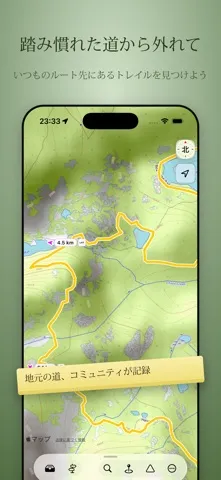
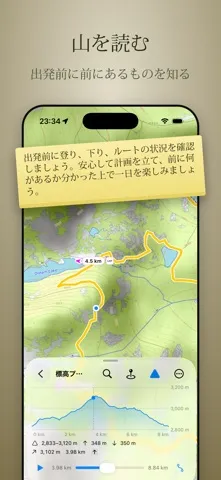
** ダウンロード後、14日間の無料トライアルをご利用いただけます ** — 一番小さなトレイル、最大の冒険。 — そのランニングコースがどれくらいの距離なのか知りたいと思ったことはありませんか?サイクリングツアーを計画していますか?またはマラソンに向けてトレーニング中で、長距離ランのコースをどこにすればよいか迷っていますか?それとも、1000カロリーを消費するにはどれくらい走ればよいのか知りたいですか?そんなあなたにぴったりなのが、ルート計画アプリ「TrailRunner mini」です。 — 踏み慣れた道から外れて。 — TrailRunner MiniはOpenStreetMapでルートを計画します。自分の地域を知る人々が手入れする地図です。標識のあるハイキングコース、シングルトラック、主要ルートから外れた自然の小道を見つけましょう。陰影起伏と等高線が地形を示し、方向の把握を助けます。 — 山を読む。 — 出発前に山を読み、前もって計画しましょう。すべてのルートには完全な標高プロフィールが付いています。メートル単位の登りと下り、最高地点と最低地点、各区間の傾斜のきつさがわかります。ルートを作成している間、登りの量がリアルタイムで加算され、平坦・起伏・急勾配がどれくらいかをバーが示します。こうして思いどおりの負荷を組み立て、プロフィールをなぞって、どこで登りどこで下るかを確認できます。 — 瞬間に没入し、決して迷わない。 — 地域を事前にダウンロードすれば、モバイル電波が届かず、GPSだけが現在地を知っているときでも、地図とナビゲーションが機能します。 — トレイルの標識をたどる。 — 独特の色と記号を持つ公式の道標をたどりましょう。それらが公式の道路網に登録されている場合、TrailRunner Miniは現地の道で見るのと同じ標識を表示します。こうして分岐ごとに、標識のある道をそのまま進むのか、別の道へ曲がるべきかがすぐにわかります。 — 地形を示す地図。 — 地図上の線だけでなく、地形そのものを見られます。TrailRunner Mini は陰影起伏と等高線を備えた地形図を描き、尾根・谷・山頂をひと目で浮かび上がらせ、美しい地域別の地図スタイルを切り替えられます。ルート周辺の地形を読み取り、それに合った道を選べます。 — 完璧なループを計画する。 — 距離、登り、カロリーなど、目標に合わせたルートを、ランニング、ハイキング、バイク、マウンテンバイクに適した道で作成しましょう。出発前に地形を把握:登りや下り、ルート全体を確認し、前に何があるかを把握したうえで一日を楽しみましょう。 — あなたの冒険を、すべてのデバイスで。 — GPX、KML、Garmin TCX/FITファイルをインポートして、自分だけのツアーに変えましょう。元の軌跡を失うことなく、編集したり、切り詰めたり、実際の道に沿わせ直したりできます。ルート、コレクション、ランドマークはMac、iPad、iPhoneで同期し続けます。 TrailRunner Miniは、踏み慣れた道の先にある道を見つけたいランナー、ハイカー、サイクリスト、マウンテンバイクライダーのために作られました。 屋外を探索する際は、常に現地の規則と公式のトレイル標識に従ってください。 利用規約 (EULA): https://www.apple.com/legal/internet-services/itunes/dev/stdeula/

編集部 PICK UP
Nib
聞き取れるメモ帳。録音すると AI が議事録・要約・次の一手に整えてくれる。
情報
- バージョン
- 4.1.1002
- 最終更新
- 2026/10/14
- リリース
- 2011/02/04
- サイズ
- 29.5 MB
- 必要環境
- iOS 26.2 以降
- 対応端末
- iPhone、iPad
- 対象年齢
- 4+
- 販売元
- Wolfgang Berberich
- 対応言語
- 日本語、英語、フランス語、ドイツ語 ほか3言語
最新バージョンの更新内容
Fixed: updating from an older TrailRunner no longer crashes at launch — your routes are kept, and a copy of the library is saved first Fixed: a route that crosses the date line, or has damaged points, no longer crashes the Mac's routes list — New: iPhone Duo — TrailRunner adapts to the folded and the opened display, in every orientation — New: map labels can show turns — a label just past every turn, its arrow pointing the way to go; Distance and Waymark labels mark each turn too New: E-bike assist — choose None, Light or Strong for Biking, Road Biking and Mountain Biking under Personal; calories and riding time are then estimated for an assisted ride New: a (?) on the inspector sections opens the matching help on the website, in your language Better: map buttons, the elevation card and hints line up with the toolbar on every iPhone and iPad, and keep clear of the Dynamic Island Better: where a route passes the same junction twice, each pass gets its own label Better: set your sex, age, weight and pace once — they apply to every route and sync across your devices Better: the elevation profile scales naturally — long routes no longer look flat and flat routes don't look steep Fixed: on iPad, the app no longer crashes when the keyboard appears Fixed: on iPad in portrait, search opens reliably — the keyboard no longer switches the screen to the sidebar layout Fixed: on iPad, the route editor's toolbar is see-through, like the browse view Fixed: changing the label type updates the map right away Fixed: on iPhone in landscape, the elevation card no longer covers the map buttons, and the buttons use the side without the notch Fixed: routes saved without real elevation now offer to download it, and the ascent colours update right after Fixed: route distances show to 10 m (e.g. 14.37 km) instead of whole kilometres Fixed: dragging the scrubber moves the position marker on the map in real time Fixed: zoom to fit shows the whole route, tall ones included, without extra margin Fixed: the number fields under Personal can be cleared while you type Fixed: after turning your iPhone sideways, the routes list is fully visible again — Better: on the Mac, pointing at the selected route fades its whole track, including the quality colours, so you can see the map underneath New: on iPhone and iPad, tap the selected route to fade it and see the map underneath — it stays faded when you tap another route, and a tap anywhere else brings it back — New: OpenCycleMap as a base map — cycle routes including the local networks, drawn in pastel over the map so the paths underneath stay visible Better: hiking, cycling and MTB route overlays are softer, so in areas with many routes the map beneath stays readable Better: the selected route's line is see-through — you can still see the path it runs on — Better: TrailRunner mini is fully compatible with macOS 27 "Golden Gate" and iOS 27 with refinements to its Liquid Glass toolbar and sidebar Better: long route titles wrap onto several lines in the inspector and the route list instead of being cut off Better: set or change a route's date in the inspector — planned and imported routes can carry the day you did them, and it syncs across your devices Fixed: routes imported without timestamps no longer show 1 Jan 2001 as their date Better: the map shows the flagged routes of the current collection faintly behind the selected route Fixed: on iPad held upright, the map style and activity scale controls are back Fixed: on the Mac, dragging a route onto a collection in the sidebar highlights the collection even when the pointer is over its name