- 対応
- iOS
どんなアプリ?
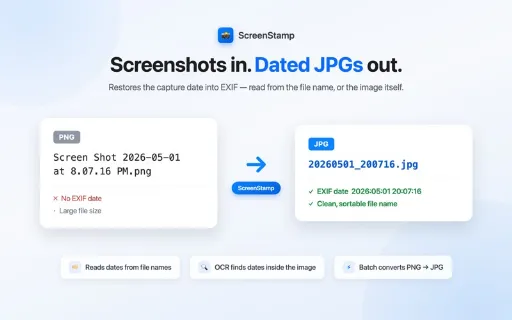
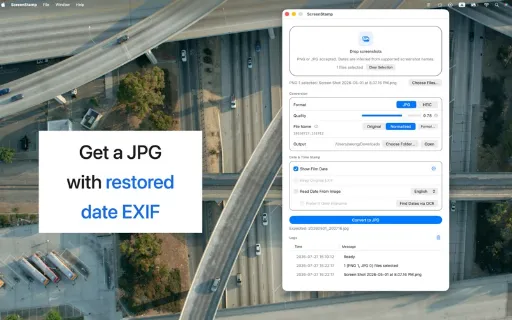
ScreenStamp is a lightweight macOS utility for cleaning up screenshot files. Drop or choose PNG, JPG, HEIC, or GIF images, and ScreenStamp will handle the repetitive parts for you:
App Store の説明を全文読む
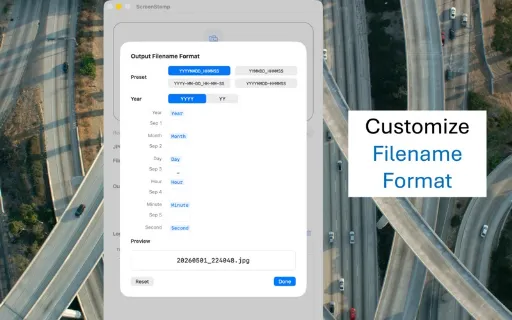
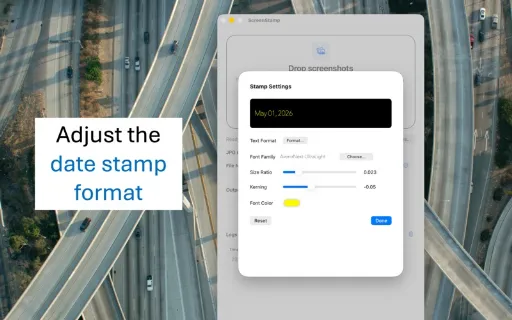
ScreenStamp は、スクリーンショットのファイルを整理するための軽量な macOS ユーティリティです。 PNG・JPG・HEIC・GIF の画像をドロップまたは選択すると、繰り返しの作業を代わりに処理します: - スクリーンショットを JPG または HEIC に変換 — 透過を残したい場合は HEIC を選んでください。JPG は透過を保存できません - スクリーンショットのファイル名から撮影日時を推定 - ファイル名に日付がない場合は、OCR で画像の中に表示されている日付と時刻を認識 — 日本語・英語・韓国語・中国語に対応 - 欠けている EXIF の日付メタデータを変換後のファイルに書き込み - 時系列で並ぶ整ったタイムスタンプ形式にファイル名を正規化 — 独自の形式も指定できます - 変換する前に、内蔵の日付認識テストでどんな日付形式でも確認 - 圧縮品質の調整 - レトロなフィルム風の日付スタンプを画像に入れるオプション 元のメタデータが失われた保管用のスクリーンショット、書き出した画像、スマートフォンのスクリーンショットに特に便利です。チャットのキャプチャにも使えます — LINE、iMessage、Discord の画面に表示されている日付の見出しとメッセージの時刻を読み取ります。 対応するファイル名には、一般的な macOS のスクリーンショット名や、アプリが書き出す名前が含まれます。例: - Screen Shot 2021-02-23 at 18.19.20 - Screenshot 2023-12-10 at 20.38.09 - スクリーンショット 2026-03-17 15.38.26 - Screenshot_20260309_191743_Internet - 20260309_191743 自分のファイルが認識されるか分からないときは、ファイル名や画面に表示されているとおりに日付を日付認識テストのパネルに貼り付けてください。ScreenStamp が読み取る日付か、読み取れない理由をお知らせします。 JPG や HEIC にすでに有効な日付の EXIF があれば、ScreenStamp はそのまま残します。 ない場合は、ファイル名から、または画像の中のテキストから撮影日時を推定してファイルに書き戻します。 たくさんのスクリーンショットを扱う人のために、速くシンプルに、より整理され検索しやすい状態にします。

編集部 PICK UP
Nib
聞き取れるメモ帳。録音すると AI が議事録・要約・次の一手に整えてくれる。
情報
- バージョン
- 1.2.5
- 最終更新
- 2026/09/15
- リリース
- 2026/04/21
- サイズ
- 0.5 MB
- 必要環境
- iOS 15.0 以降
- 対応端末
- Mac
- 対象年齢
- 4+
- 販売元
- Evergreen Soft
- 対応言語
- 日本語、英語、フランス語、ドイツ語 ほか5言語
最新バージョンの更新内容
- 新機能:クリップボードからペースト — ⌘V(または「ペースト」ボタン)で、撮ったばかりのスクリーンショットやブラウザからコピーした画像を、保存せずにそのまま追加できます - 新機能:ペーストした画像の日付 — ペーストした時刻を使うか、OCR で画像から日付を読み取ります。認識できなかった場合はペースト時刻を使用します - 改善:ファイル名の日付認識が「Image Sep 10, 2026 at 03_02_20 PM」のような英語の月名を含む書き出しファイル名にも対応しました