- 対応
- iOS
どんなアプリ?
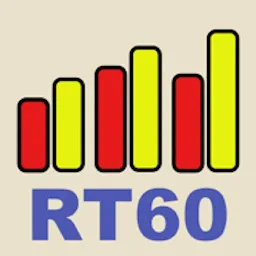
Now you can have an RT60 measurement tool for the iPhone. Another in the series of acoustic analysis and test applications from Studio Six Digital, RT60 measures reverb decay time for each octave band, 63Hz - 4kHz, by pulsing pink noise on and off, filtering the incoming signal by octave band, and measuring the timing of the decay of each octave band.
App Store の説明を全文読む
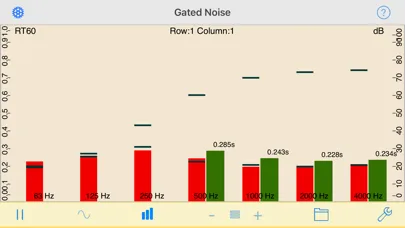
Now you can have an RT60 measurement tool for the iPhone. Another in the series of acoustic analysis and test applications from Studio Six Digital, RT60 measures reverb decay time for each octave band, 63Hz - 4kHz, by pulsing pink noise on and off, filtering the incoming signal by octave band, and measuring the timing of the decay of each octave band. RT60 conforms to international acoustics standard ISO 3382 for measuring room decay time (RT) using either the T20 or T30 method. RT60 will measure down to 50ms, and up to 4 seconds. Results are displayed for each band above the band, and the overall RT60 is calculated and displayed on the top of the screen. RT60 requires at least 25dB of headroom between the noise floor of the environment, and the level of the pink noise for T20 analysis. Turn up the amplifier to get more headroom. To use RT60, connect the iPhone output to the input of an amp and speaker, and carefully turn up the level after you tap the Generator icon. RT60 smoothes the results of several readings to get a more stable result. *** Screen Graphics The red bars are the current SPL level for each octave band. The thin black bars show the most recently measured maximum and minimum dB levels for the octave band that the RT60 calculation is using. The vertical yellow bars show the decay range that is available. Note that in some situations, you may not be able to overcome the ambient noise level in the room to get a good reading in every band. *** Calculations If a valid RT60 time can be computed, it is shown above the yellow bar. If it cannot be computed, no bar or value is shown. When your analysis is complete, you can save the graph image to your photo roll to include in a report. *** Calibration & Microphone Like all of the Studio Six Digital apps, RT60 can be calibrated. We set this field to the typical iPhone value, but if you have access to a calibrated SPL meter you can adjust this number as needed. There is a field to select Internal or External microphone. When Internal is selected, a compensation network is used to compensate for the response of the built-in or headset mic. When External is selected, no compensation is done. See our web site for more detailed information. Also, check out our other great audio and acoustics apps: AudioTools, SPL, SPL Graph, for recording SPL over time, RTA, ETC, FFT, Generator, and Speaker Pop. And, if you are looking for a great range of high-quality, professional, audio test equipment, check out iTestMic, iPrecisionMic, or liAudioInterface2.

編集部 PICK UP
Nib
聞き取れるメモ帳。録音すると AI が議事録・要約・次の一手に整えてくれる。
情報
- バージョン
- 3.9
- 最終更新
- 2026/09/11
- リリース
- 2009/03/03
- サイズ
- 26.9 MB
- 必要環境
- iOS 15.0 以降
- 対応端末
- iPhone、iPad
- 対象年齢
- 4+
- 対応言語
- 日本語、英語、フランス語、ドイツ語 ほか5言語
最新バージョンの更新内容
-Bug fixes and stability improvements -Support for latest iOS versions