
Retouch: 写真消しゴム背景人物削除AI自動機能搭載超
Anthony Durbin
App Store 評価: ★ 4.7 (23件)
- 対応
- iOS
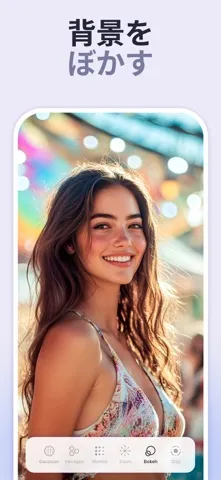
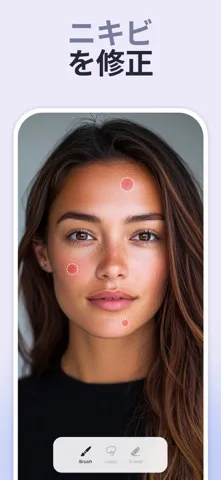
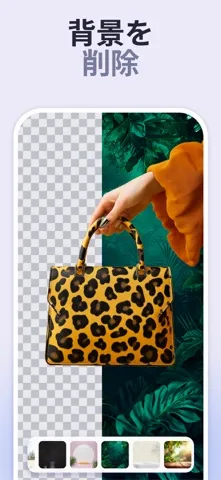
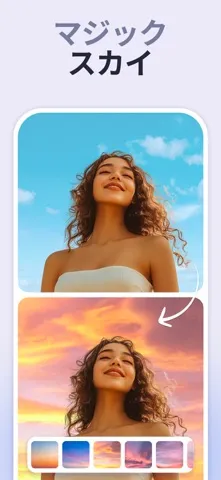
どんなアプリ?
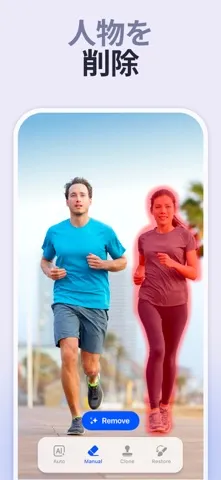
"Retouch" は、写真を手軽に編集できる優れたレタッチツールを提供します。 高速かつ非破壊のツールキットで、普通のスナップを誰でも印象的な一枚に変えられます。
App Store の説明を全文読む
Remove objects & people from photos easily with this ai retouch app. Erase backgrounds of a photo and save as transparent with just one tap. Fix your blemishes also with advanced one-tap-retouch feature. Features Remove Object: Tap or brush away tourists, wires, or stains. Quick Mode erases with AI; Brush & Lasso gives precise control. Clone Stamp: Sample any clean patch and paint over distractions. Edge-aware blending matches texture, light, and perspective. AI Retouch: One swipe zaps blemishes, smooths skin, sharpens eyes, adds a natural glow, and whitens teeth while preserving pores. Replace Background: Auto-cut subjects and drop them onto built-in scenes, your own images, or transparent PNGs for pro-grade product shots. Background Blur: Pop subjects with DSLR-style depth—Gaussian, Motion, Bokeh, Hexagon, Disc, and more—and adjust focus and strength in real time. Photo Overlay & Double Exposure: Layer textures, designer frames, or a second image, then fine-tune opacity and blend modes for instant magazine vibes. Stylish Portrait: Soft-focus backgrounds, polish facial details, and apply studio color toning for a cover-ready finish. Sky Changer: Auto-detect the horizon and swap gray skies for golden sunsets, auroras, or storm clouds with natural color matching and crisp edges. Photo Blending: AI isolates your subject and fuses it with artistic overlays; refine with manual brush and eraser for cinematic double exposures. Dripping Portrait: Melt edges into flowing paint drips; pick preset shapes or draw your own, then adjust length, direction, and gradients. Spiral Effects: Wrap subjects in neon coils, glitter ribbons, or dotted trails. Tweak thickness, color, and rotation for instant 3-D pop. This app includes advertisement. To enjoy ad free experience and using all premium contents, we are offering a Premium subscription package. Retouch Premium Subscription information • Subscription Length: Weekly, Monthly. • Your payment will be charged to your Apple account as soon as you confirm your purchase. • You can manage your subscriptions and turn off auto-renewal from your Account Settings after the purchase. • Your subscription will renew automatically unless you turn off auto-renew at least 24 hours before the end of the current period. • The cost of renewal will be charged to your account 24 hours before the end of the current period. • When canceling a subscription, your subscription will stay active until the end of the period. Auto-renewal will be disabled, but the current subscription will not be refunded. • Any unused portion of a free trial period, if offered, will be forfeited when purchasing a subscription. Privacy policy: https://sites.google.com/view/anthonydurbins/privacy Terms of service: https://sites.google.com/view/anthonydurbins/terms Contact for support, reporting bug or improvement suggestions email: [email protected] You may also contact our support team through the app’s settings screen.
編集部 PICK UP
Nib
聞き取れるメモ帳。録音すると AI が議事録・要約・次の一手に整えてくれる。
情報
- バージョン
- 5.4
- 最終更新
- 2026/08/29
- リリース
- 2022/04/28
- サイズ
- 231.2 MB
- 必要環境
- iOS 15.0 以降
- 対応端末
- iPhone
- 対象年齢
- 4+
- 対応言語
- 英語
最新バージョンの更新内容
We update our apps on a regular basis in order to make it better for you. Feel free to contact us with your valuable feedback at [email protected] or leave us a review on the App Store.