- 対応
- iOS
どんなアプリ?
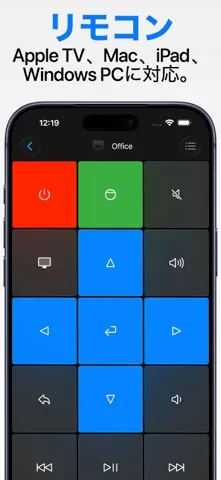
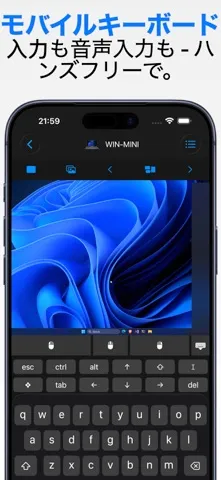
Remote, Mouse & Keyboard 1つのアプリで、もっと多くのデバイスを操作。iPhone、iPad、Macに対応しました。 Remote, Mouse & Keyboardは、あなたのAppleデバイスを、テレビ、ストリーミングデバイス、Apple TV、Mac、Windows PC、iPadのためのシンプルでパワフルなリモコンに変えます。ソファでも、デスクでも、プレゼン中でも、すばやく操作したい場所で使えます。 テレビとストリーミングのリモコン iPhone、iPad、Macを、対応するテレビ、ストリーマー、Apple TVのリモコンとして使えます。
App Store の説明を全文読む
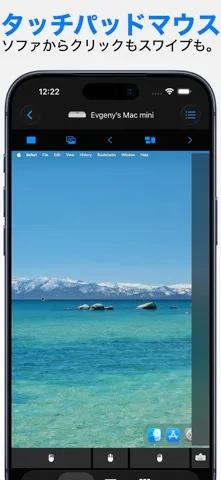
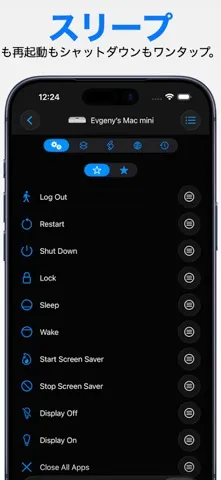
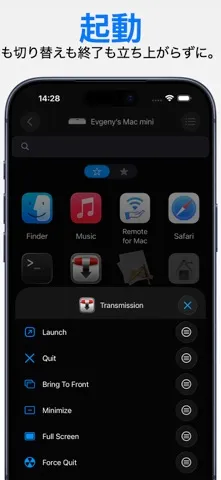
Remote, Mouse & Keyboard 1つのアプリで、もっと多くのデバイスを操作。iPhone、iPad、Macに対応しました。 Remote, Mouse & Keyboardは、あなたのAppleデバイスを、テレビ、ストリーミングデバイス、Apple TV、Mac、Windows PC、iPadのためのシンプルでパワフルなリモコンに変えます。ソファでも、デスクでも、プレゼン中でも、すばやく操作したい場所で使えます。 テレビとストリーミングのリモコン iPhone、iPad、Macを、対応するテレビ、ストリーマー、Apple TVのリモコンとして使えます。 Apple TVに加え、対応するSamsung、LG、Roku、Fire TV、Android TV、Hisense、Vizioデバイスで動作します。Android TVとGoogle TVの例には、Sony、TCL、Philips、Xiaomiなどがあります。これらは、このプラットフォームを採用するブランドの一部です。 - なめらかなtouchpadでナビゲーション - 音量、再生、メディアを操作 - キーボードで検索語やパスワードを入力 - Apple TVアプリをすばやく起動 - すべてのデバイスで使えるリモコンを手元に 第1-3世代などの古いApple TVモデルでは、物理リモコンを使った1回限りのPIN入力が必要です。 MacとPCの操作 リモコン、マウス、キーボード、よく使うアプリ向けのカスタムパネルで、Wi-Fi経由でコンピュータを操作できます。 - デバイスをワイヤレスマウスとキーボードとして使用 - 音量、再生、トラックを調整 - コンピュータ画面をライブ表示 - スクリーンショットをリモートで撮影 - アプリの起動や終了、メニュー操作、ショートカット実行 - カスタムパネルと自動化スクリプトを作成 - タイマーで操作をスケジュール MacまたはWindows用の無料ヘルパーアプリが必要です: https://rs.ltd/get iPadの操作 iPhone、iPad、Macを使って、別のiPadをBluetooth経由で操作できます。 - 入力、ナビゲーション、再生操作 - 音量とメディアを調整 - クリエイティブ、仕事、エンターテインメントの環境で2台目のデバイスを活用 選ばれる理由 - iPhone、iPad、Macのための1つのアプリ - テレビ、ストリーマー、Apple TV、Mac、PC、iPadのリモコン - Touchpad、キーボード、メディア操作、ショートカット、自動化 - アプリ、Webサイト、ワークフロー向けのカスタム操作パネル - 安全なWi-FiとBluetooth接続 システム条件 - iPhone、iPad、Mac - 対応するApple TV、Samsung、LG、Roku、Fire TV、Android TV、Hisense、Vizioデバイス - Sony、TCL、Philips、XiaomiなどのAndroid TVおよびGoogle TVデバイス - Apple TV: すべてのモデルに対応 - Mac: ヘルパーアプリを使用するmacOS 10.13以降 - Windows: ヘルパーアプリを使用するWindows 7以降 - iPad操作: Bluetooth接続 アプリ内課金とサブスクリプション Remote, Mouse & Keyboardでは、プレミアム機能、カスタマイズ、高度な自動化を利用するための任意のアプリ内課金とサブスクリプションを提供しています。 購入の確認時にApple IDアカウントに課金されます。 サブスクリプションは、現在の期間が終了する24時間以上前にキャンセルしない限り、自動更新されます。 更新料金は、現在の期間が終了する前の24時間以内にアカウントに課金されます。 サブスクリプションは、App Storeのアカウント設定でいつでも管理またはキャンセルできます。 プライバシーポリシー: https://rs.ltd/privacy 利用規約: https://rs.ltd/terms 思いのままに操作 1つのアプリ。すべての画面。iPhone、iPad、Macで使えます。

編集部 PICK UP
Nib
聞き取れるメモ帳。録音すると AI が議事録・要約・次の一手に整えてくれる。
人気の推移
App Store(日本)の公式ランキングと評価数を APPBASE が毎日記録しています。
評価数の推移
現在 919 件 (8/18から +1 件)
数値で見る
| 日付 | 評価数 |
|---|---|
| 2026/9/11 | 919件 |
| 2026/8/18 | 918件 |
App Store のレビュー
App Store に投稿された実際のユーザーレビューです(公式フィードから自動取得・最新順)。
-
★★★★★ プレミアムオファーでまともに使えない
お試しをするまもなく有料版の打診がされ、UIを試すことができませんでした。試して良さそうだったら購入しようと考えていましたが、開発元に誠意を感じないため、アンインストールします。
mynamaeis ・ 2026年8月12日 ・ v2026.37
-
★★★★★ 使いにくい
日本語入力、変換は、しにくい。やめます。
jscntksm ・ 2026年8月11日 ・ v2026.37
-
★★★★★ 最高
使いやすくて助かりました。
あかなはかたな ・ 2026年7月26日 ・ v2026.34
-
★★★★★ わからない
無料期間で解約したいのになぜかできない
ひばり面白いなかなかスピードあるし、ハマるよ! ・ 2026年7月23日 ・ v2026.33
-
★★★★★ 便利
さいこう
Pep_Pap ・ 2026年7月22日 ・ v2026.33
-
★★★★★ 課金したのに
オフラインばっかり
やgjejx ・ 2026年7月15日 ・ v2026.33
レビューの続きは App Store で読めます。
情報
- バージョン
- 2026.43
- 最終更新
- 2026/09/08
- リリース
- 2013/04/13
- サイズ
- 135.2 MB
- 必要環境
- iOS 17.0 以降
- 対応端末
- iPhone、iPad
- 対象年齢
- 4+
- 対応言語
- 日本語、AR、CA、HR ほか29言語
最新バージョンの更新内容
- Redesigned custom keypad creation and management with a cleaner editor and easier ways to create, reorder, duplicate, export, and personalize keypads. - Added a Siri and Shortcuts action that opens a saved computer directly to Keypads, Input, AirPlay, Apps, or More. - Improved Siri and Shortcuts suggestions for the TV remote actions you use, including remote keys, apps, inputs, channels, and Wake-on-LAN. - Saved computer names now refresh after a device is renamed. - Improved reliability across Siri, Shortcuts, keypad editing, and device connections.