Reference Board
Jordan Ruchtie
App Store 評価: ★ 0.0
- 対応
- iOS
どんなアプリ?
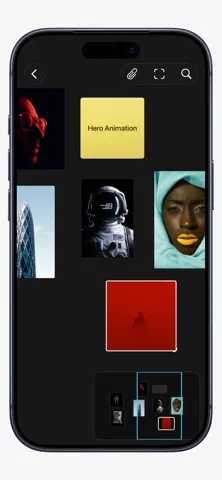
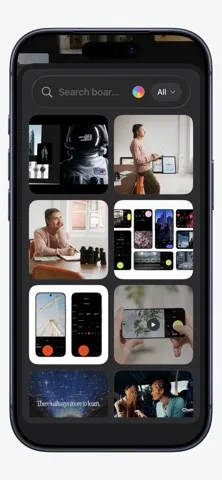
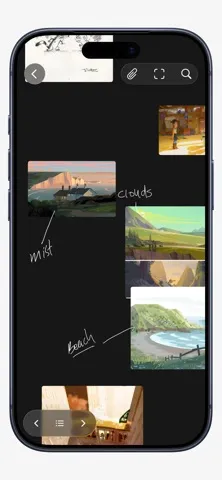
Turn inspiration into ideas with Reference Board. Reference Board is a flexible visual workspace for collecting inspiration, exploring ideas, and seeing how everything connects.
App Store の説明を全文読む
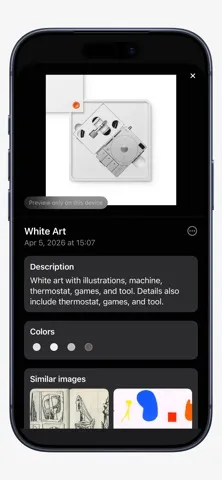
Reference Board is a private visual workspace for collecting inspiration, developing ideas, and keeping creative research close at hand on Mac, iPhone, and iPad. BUILD VISUAL BOARDS • Collect images, videos, links, text, colors, and PDFs in one place. • Arrange references freely on an infinite canvas or switch to an organized grid. • Move, resize, group, stack, crop, flip, and annotate without changing your original media. • Use the loupe to inspect fine details in images and videos. FIND WHAT YOU NEED • Search across boards and references. • Use on-device analysis, OCR, colors, metadata, and visual similarity to rediscover material quickly. • Keep notes and details attached to the work they describe. SYNC, COLLABORATE, AND SHARE • Keep your library in sync across Mac, iPhone, and iPad with iCloud. • Invite others to collaborate on shared boards. • Publish a separate public, view-only webpage when you want to present your work more widely. • Update or unpublish a published board whenever you like. WORK YOUR WAY • Import from Photos, Files, Safari, drag and drop, or the Share Sheet. • Export boards as images, PDFs, or Reference Board archives. • Use widgets, Shortcuts, the screen saver, and optional MCP automation to connect Reference Board to your workflow. ONE PURCHASE. NO SUBSCRIPTION. New customers receive Reference Pro with their App Store purchase, including unlimited private boards and items, Publish to Web, AI metadata and visual discovery, new collaborations, PDF export, and MCP automation. People who acquired Reference while it was free keep their existing Free plan with one private board and up to 20 items. They can unlock lifetime Reference Pro with a one-time in-app purchase. Reaching a Free limit never deletes or hides existing work. Original paid-app customers and people who already purchased lifetime Reference Pro keep permanent Pro access automatically.

編集部 PICK UP
Nib
聞き取れるメモ帳。録音すると AI が議事録・要約・次の一手に整えてくれる。
人気の推移
App Store(日本)の公式ランキングと評価数を APPBASE が毎日記録しています。
- グラフィック/デザイン・有料 最高9位 (7/29)
| 日付 | グラフィック/デザイン・有料 |
|---|---|
| 8/21 | 18位 |
| 8/20 | 14位 |
| 8/19 | 12位 |
| 8/9 | 97位 |
| 8/8 | 84位 |
| 8/7 | 80位 |
| 8/6 | 76位 |
| 8/5 | 68位 |
| 8/4 | 58位 |
| 8/3 | 55位 |
| 8/2 | 48位 |
| 8/1 | 16位 |
| 7/31 | 13位 |
| 7/30 | 11位 |
情報
- バージョン
- 1.5.8
- 最終更新
- 2026/09/22
- リリース
- 2026/03/19
- サイズ
- 23.0 MB
- 必要環境
- iOS 26.0 以降
- 対応端末
- iPhone、iPad
- 対象年齢
- 4+
- 対応言語
- 日本語、NL、英語、フランス語 ほか4言語
最新バージョンの更新内容
Turn a reference into a new direction on iOS 27 and iPadOS 27. • Generate new inspiration from a reference with Image Playground and add the result beside the original. • Lift an object from an image and add it to your board as a separate cutout. • Explore Similar Images in a larger grid, select several, and add them to your board. • Find references using natural-language search. • Let Smart Regions detect related references and name each group from its content. • Use Image Editing, Similar Images, and Generate Similar Image directly from Grid View. • Lock items so they cannot be moved or resized accidentally. • Enjoy faster, smoother scrolling on large grids. • Ask Siri to find references and use their saved details on supported systems. • Improved iCloud restoration on first launch and a refreshed app icon. Apple Intelligence features depend on your device, language, region, and system settings.