- 対応
- iOS
どんなアプリ?
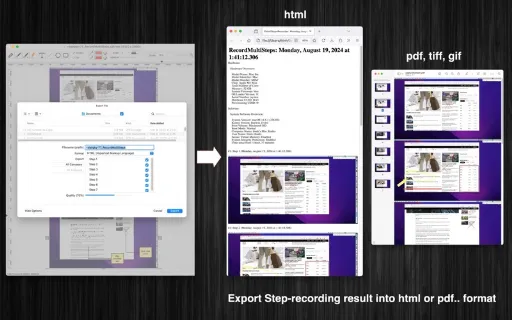
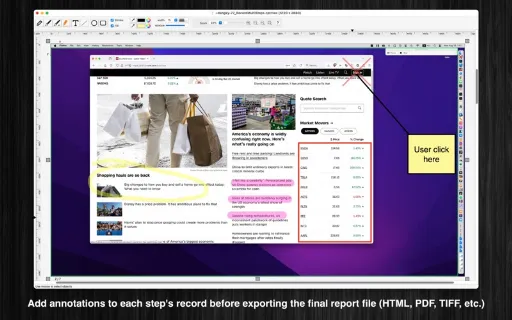
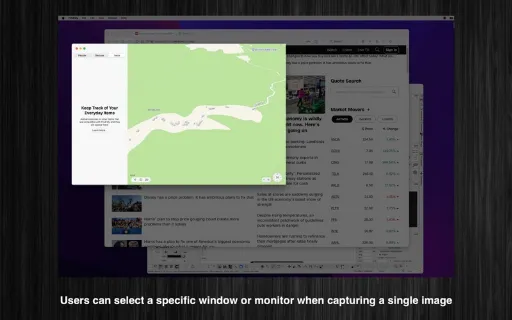
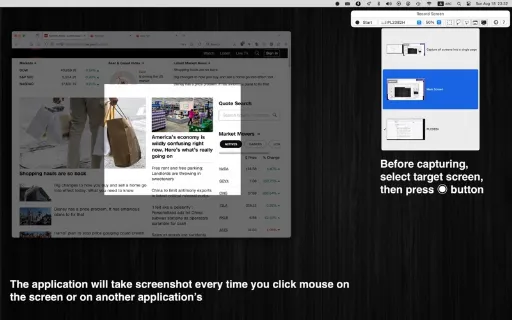
RecordMultiSteps is a tool designed to help you document issues on your Mac by capturing each step you take leading up to the problem. You can then share this recording with a support professional to assist them in diagnosing the issue. (* The number of recorded images per session is limited. You can upgrade to the Pro version to remove this limitation. *) Key Features:
App Store の説明を全文読む
RecordMultiSteps is a tool designed to help you document issues on your Mac by capturing each step you take leading up to the problem. You can then share this recording with a support professional to assist them in diagnosing the issue. (* The number of recorded images per session is limited. You can upgrade to the Pro version to remove this limitation. *) Key Features: + Precise Step Recording: The application records each step every time you left-click the mouse on the screen or within other application windows. This feature is invaluable for users who need a thorough and accurate representation of their actions, whether for troubleshooting, instructional purposes, or collaborative projects. + Open/Save to “*.cptrvec” File: If your drawing contains independent annotation objects, save it as a cptrvec file type (“*.cptrvec”) so you can edit these objects later. + Export to Report File: Press “CMD-E” to export your current document as an multi-pages format file in HTML, PDF, TIFF, PNG, JPEG, or other supported formats. + Copy/Paste: The application supports copy/paste functions for shapes. You can copy shapes or lines from the current canvas window and paste them into another window or application.

編集部 PICK UP
Nib
聞き取れるメモ帳。録音すると AI が議事録・要約・次の一手に整えてくれる。
情報
- バージョン
- 1.0
- 最終更新
- 2025/04/07
- リリース
- 2025/04/07
- サイズ
- 19.6 MB
- 必要環境
- iOS 11.0 以降
- 対応端末
- Mac
- 対象年齢
- 4+
- 対応言語
- 日本語、CS、DA、NL ほか17言語