- 対応
- iOS
どんなアプリ?
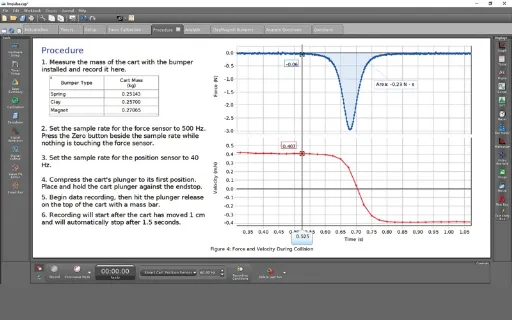
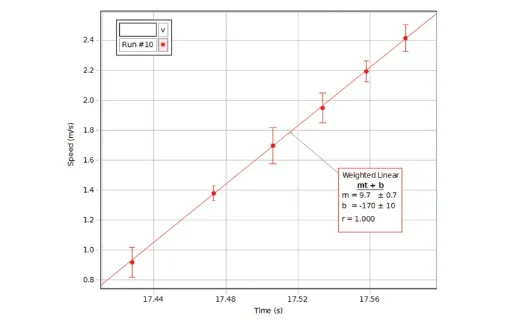
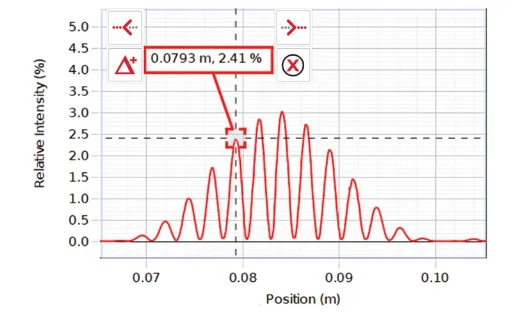
PASCO Capstone is a powerful and easy-to-use science program for collection and analysis of data using PASCO sensors. Data is collected and displayed in real time on a graph or your choice of display type. Use Capstone in the basic graph/table mode or choose to configure your own workspace with any of the many displays available. Display Types
App Store の説明を全文読む
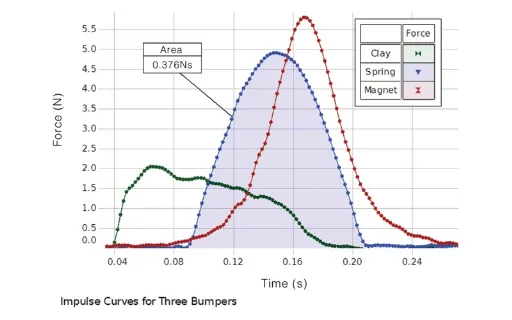
PASCO Capstone is a powerful and easy-to-use science program for collection and analysis of data using PASCO sensors. Data is collected and displayed in real time on a graph or your choice of display type. Use Capstone in the basic graph/table mode or choose to configure your own workspace with any of the many displays available. Display Types -Graph: Plot multiple measurements on a single plot area or create multiple plot areas with analysis tools including coordinates tool, curve fits, error bars, and area under the curve -Table: Easily add or subtract columns. Add calculated columns -Digits: The display can be sized to fill the whole screen. This display can also display text output from Blockly code -Oscilloscope: This display supports multiple measurements and x-y mode. The scale can be changed directly by dragging the axes -FFT: Supports multiple measurements and can zoom in for more resolution. Displays statistics such as mean and standard deviation -Meter: Choose from small arc to full circle -Bar Meter: Bar length responds to changes in the data -Histogram: Bin data and apply statistics for statistical experiments -Circuit Emulator: Construct circuit diagrams and see current flow as measured by sensors -Video Analysis: Record a movie, track a moving object, and convert the motion into data on a graph -Image Display: Insert an image, add annotations, and make measurements on the image -Text Input Box: Make notes and respond to questions. Choose font type, size, and color. Includes Greek letters Tools -Calculator: Make calculations on data sets using the usual scientific functions as well as special functions (period, amplitude, filters, and logic statements) required for analyzing data -Calibration Wizard: Takes you through the steps required to calibrate sensors -Photogate Timer Wizard: Choose from an assortment of standard timers or create your own timing sequence -Signal Generator: For controlling interfaces with signal output, choose the wave type and settings such as DC offset and frequency sweep -Data Collection Modes: Sample periodically, or manually sample when you press a key, or sample at high-speed when using an oscilloscope -Start and Stop Conditions: Begin and/or stop recording when a condition on time or a sensor measurement is met -Data Playback: Play back data with or without a synchronized movie. The speed of playback can be adjusted from slow to fast -Journal: Save and print snapshots of graphs or other displays -Blockly coding: Use Blockly coding in Capstone to program sensors and controllers to sense the environment around you and control a wide variety of things like motors, lights, and fans Highlights -Undo/Redo: Made a mistake? Just undo. Undo/redo gives you the freedom to explore without losing data -Visual Statistics: Unique to Capstone is the ability to show minimum, maximum, and mean as lines on the graph and to show the standard deviation as a shaded area. This view makes clear how much spread there is in the data -Exclude or delete outlier data points from analysis -Utilize complex curve fits like damped sine, Gaussian, sine series, and custom user-defined fits -Add error bars to the graph. Choose from percent error, fixed error, or point-by-point error defined by a data set -Draw predictions on the graph to compare to future data runs -Quick-Calcs on the graph axes allow you to linearize the data plot by changing the quantity to the quantity squared or other calculations -Synchronize videos of the phenomenon with the corresponding sensor data and replay it to see the relationship between the motion and the graph -Set your preferences for properties of the graph and many other parts of the program so the program opens with your choices of appearance and behavior Purchase: -Capstone requires a purchase of a one-year license which will grant full access to all features of Capstone -There is no trial period for Capstone

編集部 PICK UP
Nib
聞き取れるメモ帳。録音すると AI が議事録・要約・次の一手に整えてくれる。
情報
- バージョン
- 2.13
- 最終更新
- 2026/01/07
- リリース
- 2024/10/04
- サイズ
- 45.2 MB
- 必要環境
- iOS 13.3 以降
- 対応端末
- Mac
- 対象年齢
- 4+
- 対応言語
- 日本語、AR、CS、DA ほか8言語
最新バージョンの更新内容
What's New in Capstone 2.13 o New features o Added support for new PASCO products: o Wireless Voltage-Current Sensor (PS-4254) o Wireless Thermocouple (PS-4256) o Wireless Absolute Pressure-Temperature Sensor (PS-4257) o Hall Effect p-n Apparatus (SE-9670) Improvements o Added overload warning for Wireless Hand Dynamometer o Fixed various crashes and other bugs