- 対応
- iOS
どんなアプリ?
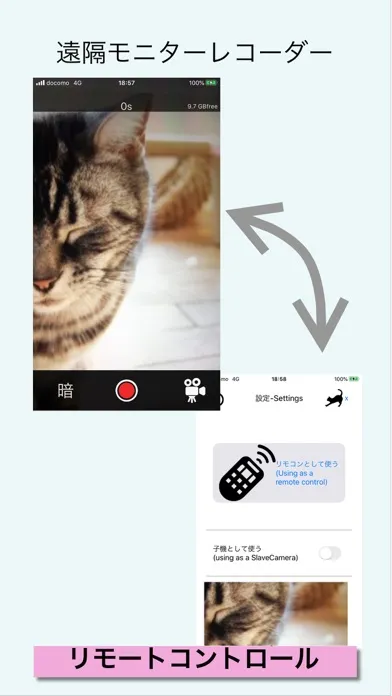
くろねこ研究所 KuronekoLab. 近距離通信を使用したリモートモニターです。単体で録画する事もできますが、1台を子機モードにして1台をリモコンとして使用するとリモートで操作できます It is a remote monitor that uses near field communication. It is possible to record by itself, but you can operate it remotely by setting one as a remote unit and using one as a remote control.
App Store の説明を全文読む
くろねこ研究所 KuronekoLab. 近距離通信を使用したリモートモニターです。単体で録画する事もできますが、1台を子機モードにして1台をリモコンとして使用するとリモートで操作できます It is a remote monitor that uses near field communication. It is possible to record by itself, but you can operate it remotely by setting one as a remote unit and using one as a remote control. 録画や撮影を行うためには、カメラとマイクへの許可が必要です。設定から許可してください。また、動画を保存するためには写真ライブラリへのアクセス許可が必要です In order to record, permission to the camera and microphone is required. Please allow from settings. You must also have access to your photo library to save videos. リモコン機能は短距離通信機能を使用します。使う為にはWifiかBluetoothをONにする必要があります。車の後部に取り付けたデバイスを操作する等、近い距離で利用します The remote control function uses the short-range communication function. To use, you need to turn on Wifi or Bluetooth. Use at a short distance, such as operating a device attached to the rear of the car. リモコンの繋ぎ方 1.最初にカメラ側を子機(Slave Mode)として設定します 2.親機(リモコン)側はリモコン画面を表示しShowDeviceで子機を探します 3.子機の名前が表示されたらタップすると、子機側に接続確認ダイアログが表示されるため接続を許可します 4.リモコンは、リモコン画面から戻ると接続が解除されます 1.First, set the camera side as slave unit (Slave Mode) 2.The master device displays the remote control screen and searches for a slave device with ShowDevice. 3.If you tap the name of the slave unit, tap it and a connection confirmation dialog will be displayed on the slave unit. 4.Remote control is disconnected when you return from the remote control screen. リモコン上の子機の一覧のデバイス名をTapすると画像をモニターできます You can monitor the image by tapping the device name in the list of slave units on the remote control. 録画したファイルは1分単位で分割されます 録画ファイルは子機側に保管されます The recorded file will be divided by 1 minute. The recording file is stored on the slave unit side.

編集部 PICK UP
Nib
聞き取れるメモ帳。録音すると AI が議事録・要約・次の一手に整えてくれる。
情報
- バージョン
- 1.5.3
- 最終更新
- 2026/02/04
- リリース
- 2020/06/24
- サイズ
- 12.7 MB
- 必要環境
- iOS 12.0 以降
- 対応端末
- iPhone
- 対象年齢
- 4+
- 対応言語
- 英語
最新バージョンの更新内容
くろねこ研究所 KuronekoLab. minor update 軽微な修正