
Hoshi Reader
Manh-Hao Steffen Pham
App Store 評価: ★ 5.0 (6件)
- 対応
- iOS
どんなアプリ?
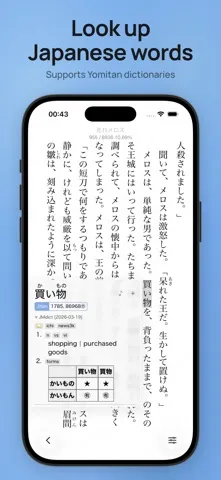
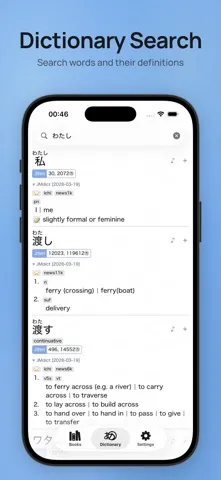
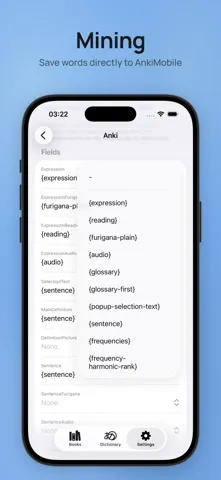
Hoshi Reader is a lightweight Japanese EPUB reader with a built-in pop-up dictionary and Anki mining support, made for immersion learning. Main Features: - Vertical (縦書き) and horizontal (横書き) reading modes - Yomitan-like pop-up dictionary with proper deinflection support - Support for all Yomitan term, frequency and pitch dictionaries - Dictionary audio support - AnkiMobile mining support - Fully
App Store の説明を全文読む
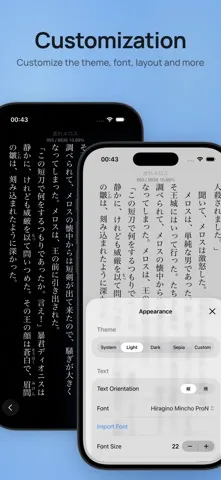
Hoshi Reader is a lightweight Japanese EPUB reader with a built-in pop-up dictionary and Anki mining support, made for immersion learning. Main Features: - Vertical (縦書き) and horizontal (横書き) reading modes - Yomitan-like pop-up dictionary with proper deinflection support - Support for all Yomitan term, frequency and pitch dictionaries - Dictionary audio support - AnkiMobile mining support - Fully configurable Anki card format, with most handlebars targeting Lapis implemented - Sasayaki (Audiobooks): Sync audiobooks to book text to read along - Reading statistics - ッツ Reader sync - Bookshelves to organize your library - Customizable theme, font and layout

編集部 PICK UP
Nib
聞き取れるメモ帳。録音すると AI が議事録・要約・次の一手に整えてくれる。
人気の推移
App Store(日本)の公式ランキングと評価数を APPBASE が毎日記録しています。
評価数の推移
現在 6 件 (9/1から +1 件)
数値で見る
| 日付 | 評価数 |
|---|---|
| 2026/10/24 | 6件 |
| 2026/9/1 | 5件 |
情報
- バージョン
- 1.4.0
- 最終更新
- 2026/08/22
- リリース
- 2026/03/24
- サイズ
- 9.4 MB
- 必要環境
- iOS 18.0 以降
- 対応端末
- iPhone、iPad
- 対象年齢
- 4+
- 対応言語
- 英語、中国語
最新バージョンの更新内容
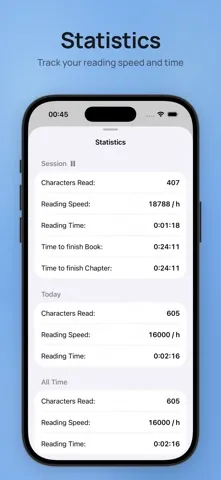
Statistics: - Added a new statistics tab - See an overview of your reading time or set a daily goal and build up a streak - Book statistics can be edited from the overview at the bottom - Statistics are archived when a book is deleted and still count towards statistics unless manually deleted - Daily reset time can be configured Sasayaki: - New control bar for playback, which can be placed on the right or left side - On new matches, playback can now pause on images for a configurable amount of time - Increased speed and delay ranges - Fixed issues with matching and auto scroll Dictionary and Anki: - Added support for kanji dictionaries - Added support for more pitch accent dictionaries - Added the option to create more than one card format - Added a button to search for the card in the card browser - Added the ability to categorize dictionaries into bilingual or monolingual and mine those into dedicated handlebars - You can choose a specific frequency dictionary to sort entries by now - In the dictionary tab, the entire search text is now shown so you can quickly look up a different part of e.g. a sentence - Long pressing the speaker icon now enables you to choose the audio source - Handlebars can also work in the tags field now General: - Added a gallery overview to quickly scroll through the images of a book - Chapters, highlights and gallery are now grouped into a new "Contents" option to reduce clutter - Added book search to find text in a book - Added the option to show separate chapter progress - Fixed the chapter overview for some books and fixed related chapter finish time calculation - Furigana can now be set to toggle and dimmed in addition to hide option - Book covers in the library can be blurred or hidden entirely now - Highlights now keep their furigana - Newly imported dictionaries can now be up to 50% smaller - Fixed an issue where text couldn't be selected in some cases - Fixed several crashes and issues, and improved general performance and stability