

- 対応
- iOS
どんなアプリ?
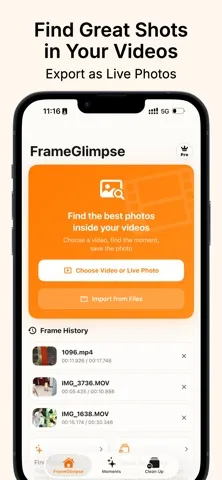
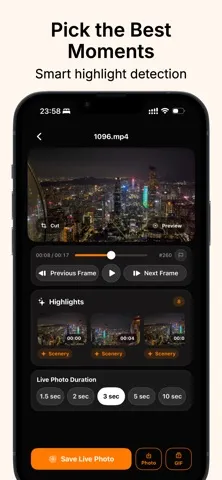
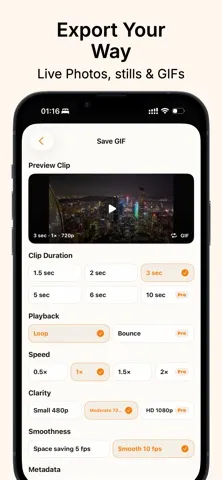
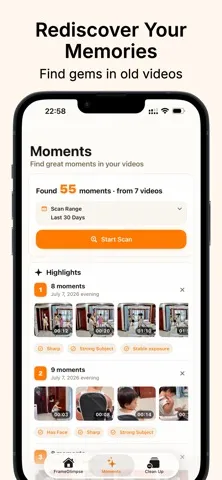
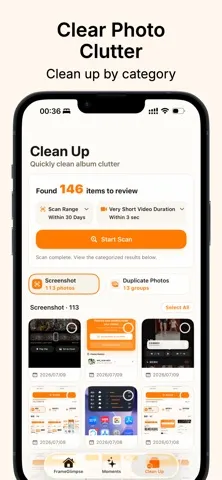
FrameGlimpse helps you find moments worth keeping from videos and Live Photos. Export video clips as Live Photos, still images, or GIFs.
App Store の説明を全文読む
FrameGlimpse helps you find moments worth keeping in videos and Live Photos, then save them as Live Photos, still images, or GIFs. Move through videos frame by frame, choose a cover frame, crop the image, and preserve the original capture date and location. You can also clean up clutter in your photo library by finding screenshots, duplicate photos, very short videos, screen recordings, receipts, IDs, barcodes, and parking spot photos. Memories brings back highlights from this day in past years, so you can rediscover moments you may have forgotten. Main Features: * Use on-device intelligence to find standout moments in your videos * Browse videos and Live Photos frame by frame and save them as Live Photos, still images, or GIFs * Adjust clip duration, playback mode, playback speed, quality, and smoothness * Crop freely or choose from Original, 1:1, 4:3, 3:2, and 16:9 aspect ratios * Support for both HDR and SDR video, preserving the quality of HDR content when exporting * Browse Memories and revisit highlights from this day in past years * Clean up photo library clutter by finding and organizing old screenshots, duplicate photos, similar burst shots, very short videos, screen recordings, selfies, parking spot photos, barcodes, receipts, and IDs, with more categories to come Pro Features: * Export Live Photos in lossless quality. Lossless export for still images is completely free. * Export to the iOS Files app. Exporting to the Photos app is completely free. * Unlock additional GIF export options, including bounce playback, 2x speed, and HD 1080p * Unlock additional Cleanup categories and advanced organizing tools, and scan a wider range of video content to discover more standout moments * Batch export candidate frames and organize your photo library in batches Great For: * Saving a perfect moment from videos of your baby, pets, travels, gatherings, performances, or sports * Recovering a high-quality photo from a video when you forgot to take a photo while recording * Turning video clips into Live Photos or GIFs for easy sharing * Cropping a frame to keep only the part that matters * Finding old screenshots you no longer need * Sorting through duplicate photos, similar burst shots, screen recordings, and very short videos before deciding what to keep * Quickly finding receipts, IDs, barcodes, or parking spot photos in your library Privacy & Safety: * FrameGlimpse only accesses the photos and videos you explicitly allow it to access * All recognition, analysis, and organization happen locally on your device. Your photos and videos are never uploaded * Network access is used only to download original media you choose to process from iCloud and to connect to the App Store for purchases or purchase restoration * No account required. No ads, no third-party analytics, and no tracking * Nothing is deleted automatically. Content is only saved, exported, or deleted after you explicitly confirm the action Privacy Policy: https://wwmmkk.github.io/FrameGlimpse/PrivacyPolicy Terms of Use (EULA): https://www.apple.com/legal/internet-services/itunes/dev/stdeula/

編集部 PICK UP
Nib
聞き取れるメモ帳。録音すると AI が議事録・要約・次の一手に整えてくれる。
情報
- バージョン
- 1.1.10
- 最終更新
- 2026/09/26
- リリース
- 2026/07/09
- サイズ
- 38.2 MB
- 必要環境
- iOS 17.0 以降
- 対応端末
- iPhone
- 対象年齢
- 4+
- 対応言語
- 日本語、AR、CS、英語 ほか12言語
最新バージョンの更新内容
This update fixes an issue where music apps playing in the background might not automatically resume playback after videos finish playing in the Memories tab. Recent updates: • New: Create GIF stickers for WeChat — just select “WeChat Sticker” on the GIF export screen. • New: Live Photo exports now support “Unlimited Duration.” • New: Favorite Memories — you can now mark memories as favorites in the Memories tab and keep them synced across all your devices with iCloud. • Improved: Refined the frame extraction timeline, making it easier to see your current preview position and the selected range for the Live Photo. • Improved: Fixed known issues. Feel free to send me your feedback and suggestions through the in-app feedback option. If you enjoy the app, I’d also really appreciate a review on the App Store!