
FencingLab
Langtian Du
App Store 評価: ★ 0.0
- 対応
- iOS
どんなアプリ?
FencingLab — AI Fencing Coach Transform your fencing with AI-powered video analysis. Record or upload your bouts, and FencingLab breaks down your technique, tracks your progress over time, and delivers person
App Store の説明を全文読む
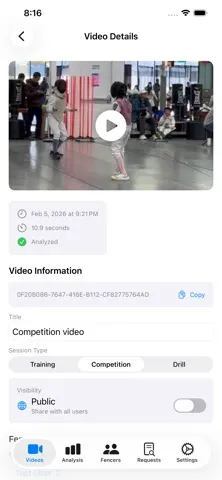
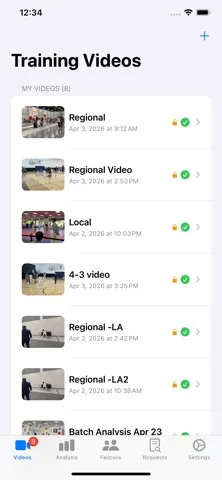
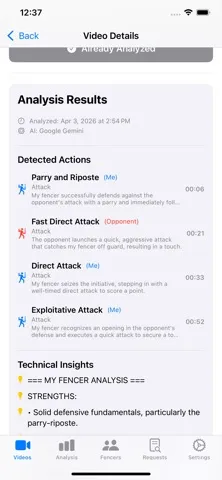
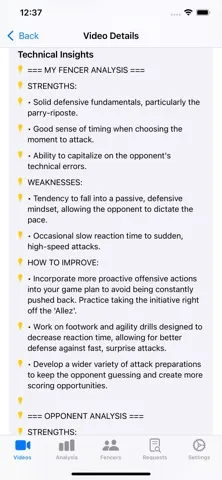
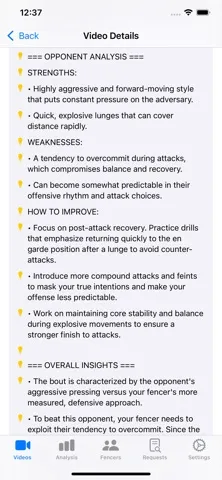
FencingLab — AI Fencing Coach Transform your fencing with AI-powered video analysis. Record or upload your bouts, and FencingLab breaks down your technique, tracks your progress over time, and delivers personalized training recommendations. What FencingLab does: • Analyzes fencing videos using advanced AI to identify actions, timing, and technique • Tracks improvement across sessions with progress charts and skill scores • Provides tactical matchup analysis against specific opponents • Supports Foil, Épée, and Sabre • Works for athletes and coaches managing multiple fencer profiles AI Analysis Options: • Gemini AI — cloud-based analysis for detailed, high-quality feedback • Local AI — on-server processing with no third-party data sharing Subscription: FencingLab offers auto-renewable subscriptions that unlock Gemini AI analysis. A 7-day free trial with 5 complimentary credits is included at sign-up. Subscriptions are billed through your Apple ID. You can manage or cancel your subscription at any time in App Store Settings. Privacy: When Gemini AI is selected, your video is sent to Google's servers for analysis. Local AI keeps all processing on our servers with no third-party sharing. Your privacy choices are always in your control in the app settings. Terms of Use (EULA): https://www.apple.com/legal/internet-services/itunes/dev/stdeula/

編集部 PICK UP
Nib
聞き取れるメモ帳。録音すると AI が議事録・要約・次の一手に整えてくれる。
人気の推移
App Store(日本)の公式ランキングと評価数を APPBASE が毎日記録しています。
- スポーツ・有料 最高10位 (8/21)
| 日付 | スポーツ・有料 |
|---|---|
| 8/24 | 31位 |
| 8/23 | 26位 |
| 8/22 | 22位 |
| 8/21 | 10位 |
情報
- バージョン
- 3.0
- 最終更新
- 2026/08/27
- リリース
- 2026/02/28
- サイズ
- 4.5 MB
- 必要環境
- iOS 16.0 以降
- 対応端末
- iPhone、iPad
- 対象年齢
- 4+
- 対応言語
- 日本語、英語、フランス語、ドイツ語 ほか4言語
最新バージョンの更新内容
New in FencingLab 3.0 1. AI Daily Training Plans - Every day, the AI builds a personalized training target based on your recent video analyses. - Two parts: - Fencing drills — e.g. footwork ladders, bladework exercises, each with a description and duration/reps. - Physical conditioning — e.g. jump rope, push-ups, agility work. - The next day, the AI reviews your latest video to mark the previous target as met / partial / missed, and adapts the new plan from your actual progress. 2. Resumable Video Uploads - Videos now get a stable, content-derived ID, so if an upload fails or is interrupted, retrying continues the same upload instead of starting over or creating a duplicate. - Larger, more reliable uploads via chunked transfer. 3. One-Tap Video Import - Share a video straight into FencingLab from Photos, Files, or any app using the iOS share sheet. - Pick the title, session type (training/competition/drill), and visibility before uploading. 4. Improved AI Analysis - Technical breakdown with coaching moments (screenshot thumbnails of key actions) and an interactive timeline so you can jump straight to the moment that needs work.