


Device System Services - Tools
Albert Parti
App Store 評価: ★ 4.6 (17件)
- 対応
- iOS
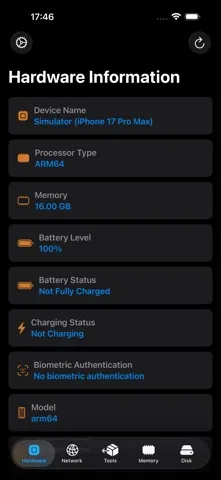
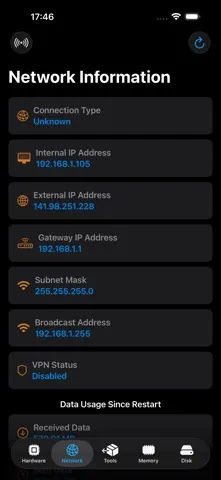
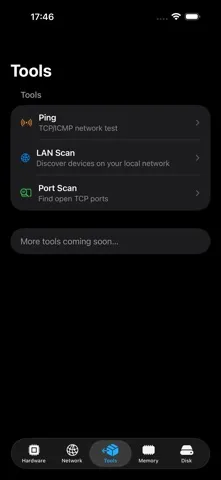
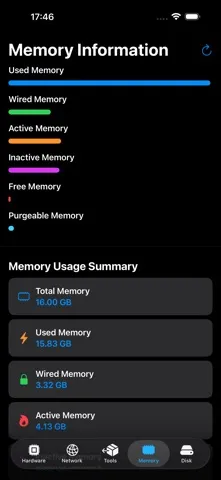
どんなアプリ?
Device System Service – System Information & Performance Monitoring Device System Service is a professional iOS application that provides detailed insights into your device’s hardware, network, memory, and storage. The app helps you monitor system performance, optimize resource usage, and ensure smooth operation. Key Features
App Store の説明を全文読む
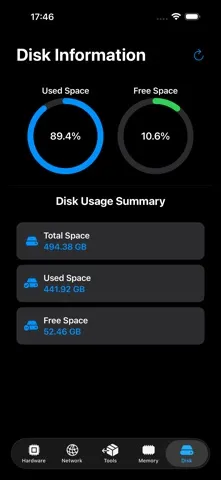
Device System Service – System Information & Performance Monitoring Device System Service is a professional iOS application that provides detailed insights into your device’s hardware, network, memory, and storage. The app helps you monitor system performance, optimize resource usage, and ensure smooth operation. Key Features Hardware Information • Detailed specifications of your device’s model, processor, and GPU • Battery level and status monitoring • Biometric authentication support (Face ID, Touch ID) • Display size, brightness, and other screen-related details Network Status • IP address, Wi-Fi, and mobile network information • Internet connection check and speed data • Ping hosts or IP addresses to verify connectivity and response time • Local network insights and diagnostics Memory Usage • Detailed breakdown of memory usage (used, active, inactive, free memory) • Real-time memory monitoring with interactive charts • Performance tracking and optimization suggestions Tools The new Tools tab provides powerful built-in diagnostic utilities for advanced network analysis. • Ping Verify connectivity to any host or IP address and check network responsiveness in real time. Ideal for troubleshooting reachability and latency issues. • LAN Scan Discover active devices connected to your local network. Quickly identify IP addresses and detect available hosts within your subnet. • Port Scan Scan open TCP ports on a target device to analyze running services and network exposure. Useful for diagnostics, testing, and infrastructure validation. Storage Management • Total storage and available space display • Breakdown of space occupied by files and apps • Visual representation of disk usage with modern UI elements Settings & Privacy • Remove Ads – One-time purchase for a completely ad-free experience • Manage Consent – GDPR/CCPA compliance options • Ad Personalization – Customize ad preferences based on privacy policies Modern & User-Friendly Experience • Dark Mode support for a comfortable viewing experience • Interactive visual elements, graphs, and bars for easy interpretation • Optimized for both iPhone and iPad System Service Widgets – Overview The System Service app is designed for iOS system monitoring and now features three useful widgets that display key system information in real-time. Available Widgets: Device Information Widget Displayed Data: • Device name • Battery level • iOS version • Local (LAN) and external (WAN) IP addresses Usage: This widget provides a quick overview of your device, making it especially useful for developers, network administrators, and power users. Disk Usage Widget Displayed Data: • Disk usage percentage (circular progress bar) • Used storage amount (GB) • Total storage capacity (GB) Usage: This widget allows you to instantly check how much storage is available on your device. It’s particularly useful when managing large files or installing new applications. Memory Usage Widget Displayed Data: • Memory usage percentage (circular progress bar) • Used memory amount (GB) • Total memory capacity (GB) Usage: A great tool for monitoring background app memory usage, helping optimize device performance. How to Add the Widget? 1. Long-press the home screen. 2. Tap the ”+” icon in the top-left corner. 3. Scroll down to the System Service widgets. 4. Select your preferred widget size. 5. Tap “Add Widget.” Why Use It? • Provides quick system data access • Helps optimize storage and memory usage • Easily accessible—no need to open an extra app Download and try it now!

編集部 PICK UP
Nib
聞き取れるメモ帳。録音すると AI が議事録・要約・次の一手に整えてくれる。
App Store のレビュー
App Store に投稿された実際のユーザーレビューです(公式フィードから自動取得・最新順)。
-
★★★★★ メモリ解放まで
素晴らしい
工藤明生 ・ 2024年10月29日 ・ v2.2.5
-
★★★★★ うざい
有料なのに画面を変える度動画の広告が出る。 機能以前の問題。 即削除しました。
PCでeTypisyつかってます ・ 2021年1月22日 ・ v2.2.2
-
★★★★★ 重さを感じない!
もたもたせずサクサク見られるのが良いかも?( ^ω^ )
khalif ・ 2020年8月3日 ・ v2.2.1
レビューの続きは App Store で読めます。
情報
- バージョン
- 2.7
- 最終更新
- 2026/09/13
- リリース
- 2016/06/22
- サイズ
- 9.4 MB
- 必要環境
- iOS 16.6 以降
- 対応端末
- iPhone、iPad
- 対象年齢
- 4+
- 対応言語
- 日本語、CS、英語、FI ほか11言語
最新バージョンの更新内容
• DNS lookup with multiple record types • WHOIS/RDAP lookup for domains and IP addresses • HTTP checker with GET/HEAD requests, status code, response time, redirects, and headers • SSL/TLS checker with certificate status, subject, certificate chain, and SHA-256 fingerprint