- 対応
- iOS
どんなアプリ?
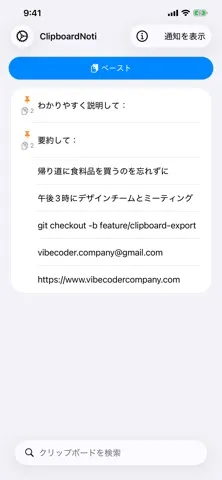
Save anything you copy. Paste it back later from a persistent notification. THE PROBLEM You copy something on your phone — a link, an address, a snippet of text — and the next time you copy, it's gone. iOS only remembers one thing at a time, and there's no way to get the old one back.
App Store の説明を全文読む
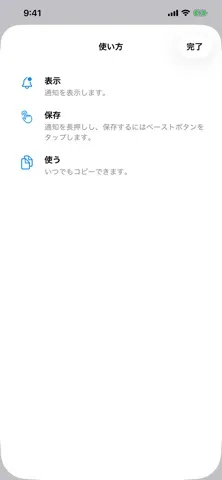
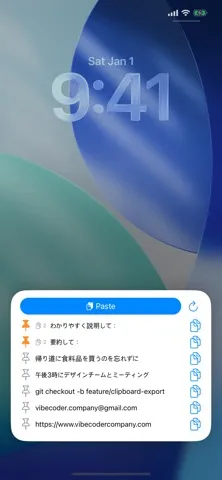
Save anything you copy. Paste it back later from a persistent notification. THE PROBLEM You copy something on your phone — a link, an address, a snippet of text — and the next time you copy, it's gone. iOS only remembers one thing at a time, and there's no way to get the old one back. WHY EXISTING SOLUTIONS FAIL Most clipboard managers force you to switch apps, juggle widgets, or read your clipboard in the background — which triggers the privacy banner you've seen pop up all over iOS. None of them feel native. THE SOLUTION ClipboardNoti lives in your Notification Center. Tap Show Notification, then long-press it whenever you want to save what you just copied. Pasting goes through Apple's privacy-respecting Paste button — no "Pasted from..." banner, ever. Pin the entries you reuse most. Search across your full history. Copy anything back to the system clipboard with a tap. No ads. No tracking. No reading your clipboard in the background. Just a clipboard that finally remembers.

編集部 PICK UP
Nib
聞き取れるメモ帳。録音すると AI が議事録・要約・次の一手に整えてくれる。
情報
- バージョン
- 1.1
- 最終更新
- 2026/07/30
- リリース
- 2026/05/08
- サイズ
- 10.9 MB
- 必要環境
- iOS 18.1 以降
- 対応端末
- iPhone、iPad
- 対象年齢
- 4+
- 対応言語
- 日本語、AR、CA、HR ほか29言語
最新バージョンの更新内容
- 「使い方」にコントロールセンターのスクリーンショットを追加 - ヒントでClipboardNotiをコントロールセンターに固定しやすく - 通知の自動更新を削除 — 一番上に戻すにはコントロールセンターをタップ - 設定の「すべてのApp」を整理