
CHAMPS Mobile Maintenance
CHAMPS Software, Inc
App Store 評価: ★ 0.0
- 対応
- iOS
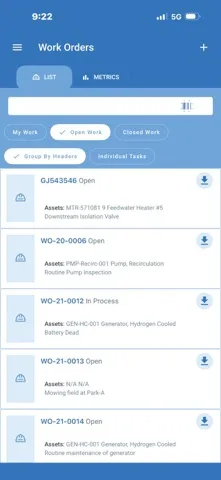
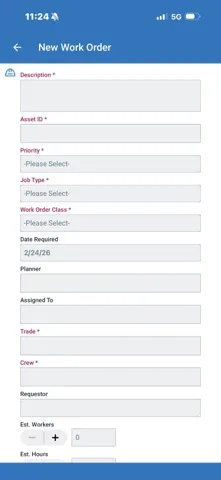
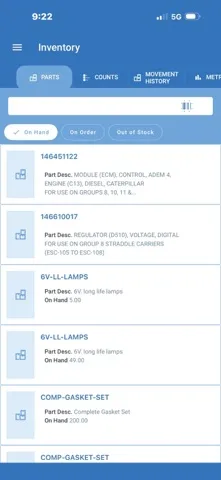
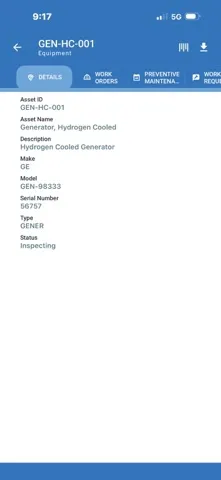
どんなアプリ?
Highlights • Mobile UI designed with field workers in mind, that lets you take CHAMPS on the go. • Complete work packages, enter meter readings, count inventory. • Snappy desktop-like experience powered by a front-end framework that works on the most popular devices • Easy navigation to get to where you want to go the moment you think it. • Improved search experience to get you the results you ne
App Store の説明を全文読む
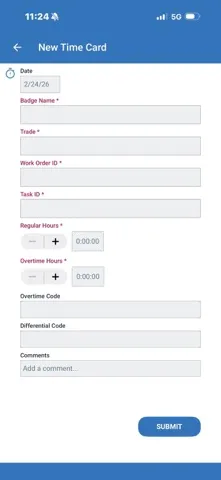
Highlights • Mobile UI designed with field workers in mind, that lets you take CHAMPS on the go. • Complete work packages, enter meter readings, count inventory. • Snappy desktop-like experience powered by a front-end framework that works on the most popular devices • Easy navigation to get to where you want to go the moment you think it. • Improved search experience to get you the results you need, the way you need them by using autocomplete search, barcode reading, and voice-to-text recognition. CMMS Mobile features • Equipment The Mobile Equipment screens are designed to display ‘boilerplate’ and maintenance history information. They contains all the information related to an equipment record providing direct access to work orders, PMs, parts, Work Requests, and attachments. • Work Orders Review the work assigned to you. Verify procedures, Work Order steps, parts, costs, and other historical data related to the work that has already been performed. Register completed work orders as it gets done in the field. • Parts / Inventory The Mobile Inventory screens are designed to display SKU and Inventory data along with usage, availability, and supplier information. It contains details for vendors with direct access to send emails and make phone calls. Users can count parts without reaching out to a computer. The differences between units listed as on hand and actual units counted can be reconciled on the go, maintaining an up to date inventory. • Work Requests Document any work that needs to be taken care of. Enter problem description and even attach photos taken in the field. • Meters Take Meter readings on the go with the app. Readings like temperature values, miles on an odometer, levels on a water tank. • Timcards Enter timecards from the field, right after completing a Work Order. • Dashboards / KPIs Control your CMMS with KPIs and Statistics. On hand information that summarizes selected record counts and costs or Equipment, Work Orders, and Inventory. • User profile and settings A drawer-Style Menu provides quick access to each section of the App. It’s also used for displaying relevant user information, like current location which is used to filter user’s data. The Multi-user management feature allows the mobile device to be shared among different users while keeping all stored data unique, separate, and secure.

編集部 PICK UP
Nib
聞き取れるメモ帳。録音すると AI が議事録・要約・次の一手に整えてくれる。
情報
- バージョン
- 2.3.18
- 最終更新
- 2026/02/25
- リリース
- 2019/08/23
- サイズ
- 82.1 MB
- 必要環境
- iOS 16.1 以降
- 対応端末
- iPhone、iPad
- 対象年齢
- 4+
- 販売元
- CHAMPS, Software, Inc.
- 対応言語
- 日本語、フランス語、スペイン語
最新バージョンの更新内容
Enhanced Barcoding Search Each search bar now includes a Scan icon allowing the user to scan barcodes or QR codes to pull up assets, work orders, work requests or inventory. UI Enhancements The latest CHAMPS Mobile UI improvements deliver a cleaner, more intuitive experience. Push Notifications Optional push notifications that keep teams informed about assigned work without overwhelming them.