- 対応
- iOS
どんなアプリ?
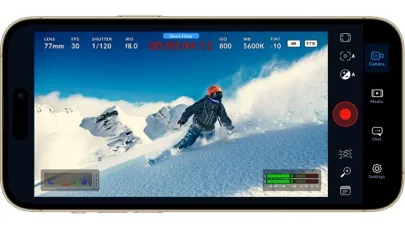
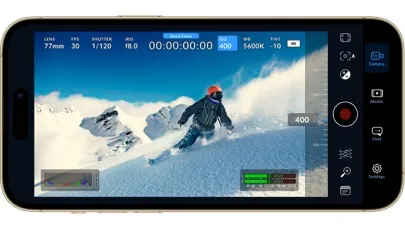
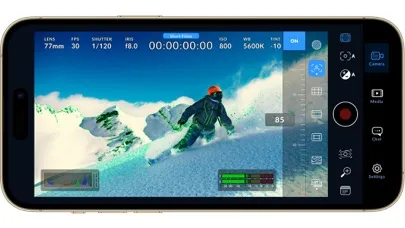
Introducing Digital Film for iPhone and iPad! Blackmagic Camera unlocks the power of your iPhone and iPad by adding digital film camera controls and operating systems! Now you can create the same cinematic ‘look’ as Hollywood feature films. You get the same intuitive and user friendly interface as Blackmagic Design’s award winning cameras. So it’s just like using a professional digital film camera
App Store の説明を全文読む
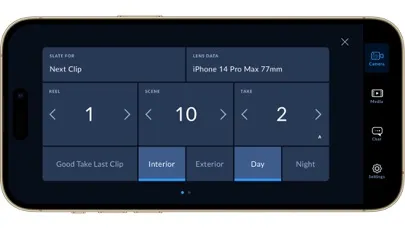
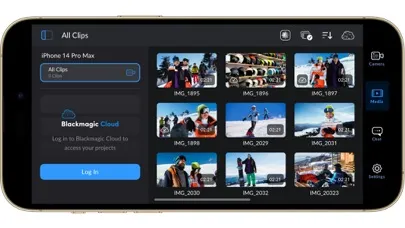
Introducing Digital Film for iPhone and iPad! Blackmagic Camera unlocks the power of your iPhone and iPad by adding digital film camera controls and operating systems! Now you can create the same cinematic ‘look’ as Hollywood feature films. You get the same intuitive and user friendly interface as Blackmagic Design’s award winning cameras. So it’s just like using a professional digital film camera! This means you can adjust settings such as frame rate, shutter angle, white balance and ISO all in a single tap. Or record directly to Blackmagic Cloud in industry standard 10-bit Apple ProRes files up to 4K! Recording to Blackmagic Cloud Storage lets you collaborate on DaVinci Resolve projects with editors anywhere in the world, all at the same time! Get the "Hollywood Look" with Digital Film! Blackmagic Camera puts the professional features you need for feature film, television and documentaries in your pocket. Now you can create YouTube and TikTok content with a cinematic look, and broadcast quality ENG! Imagine having a run and gun camera on hand to capture breaking news whenever it happens! Or use Blackmagic Camera as a B Cam to capture angles that are difficult to reach with traditional cameras, while still retaining control of important settings. Best of all, recording to Blackmagic Cloud allows you to get your footage to the newsroom or post production studio in minutes. Interactive Controls for Fast Setup Blackmagic Camera has all the controls you need to quickly setup and start shooting! Everything is interactive, so you can tap any item and instantly change settings without searching through confusing menus! The HUD shows status and record parameters, histogram, focus peaking indicators, levels, frame guides and more. Show or hide the HUD by swiping up or down. You can auto focus by tapping the screen in the area you want to focus. You can shoot in 16:9 or vertical aspect ratios, plus you can shoot 16:9 while holding your phone vertically if you want to shoot unobtrusively. On Screen Heads Up Display The heads up display, or HUD, controls have the most important camera controls such as lens selection, frame rate, shutter angle, timecode, ISO, white balance, gain and audio levels. You can adjust settings such as exposure by touching the ISO indicator, or you can change the audio levels simply by touching the audio meters. Everything is interactive, so if you tap any item you can instantaneously change its settings without having to search through complex menus! Camera Setup Menus The settings tab unlocks the full power of your phone’s camera, with quick access to advanced settings such as monitoring, audio, camera setup, recording and more! The record tab gives you total control over video resolution and recording format including industry standard Apple ProRes or space efficient H.264 and H.265. Plus, you can set anamorphic de-squeeze and lens correction settings. Professional audio options include AAC and PCM format and VU or PPM audio metering. You can even add external microphones! Or add 3D LUTs to recreate film looks! Media The Blackmagic Camera media tab has all the controls you need to browse or scrub clips for quick review, search and sort and view the upload status of your media. Access your media from Blackmagic Camera’s all clips folder by choosing the Media button to see the thumbnails for each clip you have stored. Plus, you can save to the files folder on the phone, send it to Blackmagic Cloud Storage via Blackmagic Cloud or manually choose which clips to upload to a project library. You can even sync media from Blackmagic Camera directly into the DaVinci Resolve project so you’re ready to edit! Live Sync to Blackmagic Cloud Storage When shooting with Blackmagic Camera, the video you capture can be instantly uploaded as a proxy file, followed by the camera originals, and saved to Blackmagic Cloud Storage. This means you can start editing quickly using your proxies, speeding up your workflow.

編集部 PICK UP
Nib
聞き取れるメモ帳。録音すると AI が議事録・要約・次の一手に整えてくれる。
人気の推移
App Store(日本)の公式ランキングと評価数を APPBASE が毎日記録しています。
- 写真/ビデオ・無料 最高34位 (8/21)
| 日付 | 写真/ビデオ・無料 |
|---|---|
| 10/25 | 73位 |
| 10/21 | 72位 |
| 9/16 | 74位 |
| 8/28 | 88位 |
| 8/27 | 87位 |
| 8/26 | 85位 |
| 8/25 | 92位 |
| 8/24 | 75位 |
| 8/23 | 71位 |
| 8/22 | 55位 |
| 8/21 | 34位 |
| 8/20 | 84位 |
| 8/19 | 83位 |
| 8/18 | 88位 |
App Store のレビュー
App Store に投稿された実際のユーザーレビューです(公式フィードから自動取得・最新順)。
-
★★★★★ うまく調整して欲しい
外部HDDに保存出来るのはありがたい!、熱が籠り過ぎるのが玉にきずかや
あ8585 ・ 2026年7月19日 ・ v3.3.1
-
★★★★★ グリッドがー、、、
横向き動画を撮りたいのにグリッドが縦向きのまま。何とかならないですか? また、シャタースピード固定の場合、ISOの自動が選べないのも何とかして欲しいです。
一般人2 ・ 2026年7月17日 ・ v3.3.1
-
★★★★★ スイッチャーに取り込んだ際にカメラを縦向きに出来なくなった
表題の通り、縦向きで写して投影したい場合でも以前では使用できていたが、 現在では出来なくなっており、大半が画角外になり横向きに… 撮影後のものは縦になるが、そんなもの写真アプリでできるので… 詳細機能はあるがバラエティ色のある公演では使用出来なくなりました。
Ky229 ・ 2026年6月30日 ・ v3.3.1
-
★★★★★ Hediously Cyan Predominates Bug in Bake-in Imported Lut Recording
Now Every Lut Imported is HEDIOUSLY CYAN PREDOMINANTLY PROCESSED - JEOPARDIZES PROPER BLUE OCEAN & SKY NOT USABLE AT ALL IN BAKING-IN. WHAT HAPPENED TO MIGHTY Black Magic Camera App WE HAVE NEVER EXPERIENCED THIS ABYSMAL BUG !!!!!!!!!!!!!!!! FIX ASAP !!!!!!!!!!!!!!!!
xrnobia242 ・ 2026年5月14日 ・ v3.3.1
-
★★★★★ 時々挙動があやしい
機能的には概ね満足しているのですが、時々挙動があやしいです。iPhone17Proで動画をアプリ内と写真フォルダの両方に記録する設定にしているのですがたまに写真フォルダに記録されてないことがありました。データが見つからない時には自分の撮影ミスだと絶望する前にアプリの「メディア」フォルダを確認してみましょう。
ハトPOD ・ 2026年5月1日 ・ v3.3.1
-
★★★★★ 純正フォトアプリとの切り替え
アプリそのものは全く良い出来で申し分ないです。小さい要望で恐縮ですが、動画の再生中に画面の左右スライドで次の動画に切り替えた際、再生を自動的にスタートさせるスイッチがあったらプレビュー時に楽で良いなと思っています。また、純正フォトアプリを使用中にアクションボタンを通じて本アプリを起動させると、UIが不自然にクロップされた状態で起動したり、撮影画面に何も映らず真っ黒な状態になったり、最後にはフリーズし...
たろーz ・ 2026年4月22日 ・ v3.3.1
レビューの続きは App Store で読めます。
情報
- バージョン
- 3.4.1
- 最終更新
- 2026/08/19
- リリース
- 2023/09/14
- サイズ
- 200.2 MB
- 必要環境
- iOS 17.0 以降
- 対応端末
- iPhone、iPad
- 対象年齢
- 4+
- 対応言語
- 日本語、英語、フランス語、ドイツ語 ほか5言語
最新バージョンの更新内容
• Apple Watch controls for codec, resolution and colorspace. • Controller displays lens information for supported cameras. • Support for latency specification in SRT stream settings. • Addressed occasional video recording issue when losing app focus. • Addressed issue with viewing Blackmagic Cloud folders. • General performance and stability improvements.