
剪流 - オールインワン動画・音声編集ツール
辉 周
App Store 評価: ★ 0.0
- 対応
- iOS
どんなアプリ?
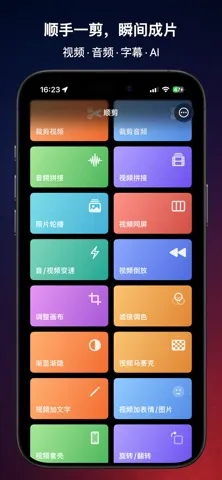
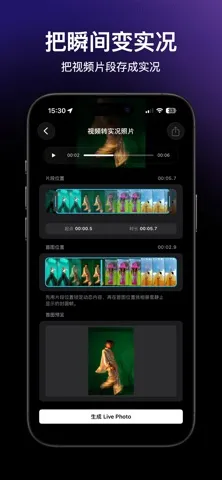
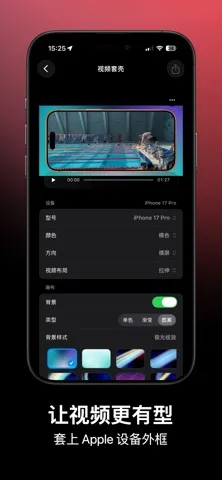
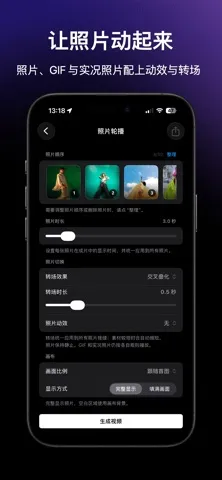
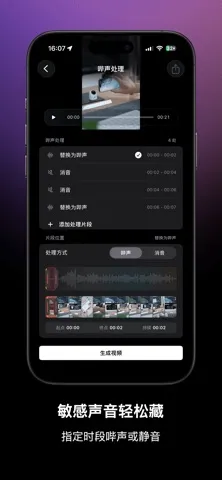
剪流(ClipFlow)は、日常の動画、画面収録、音声クリップをすばやく編集するためのアプリです。必要な部分だけを切り取り、複数のクリップをつなぎ、テキストやステッカー、字幕、BGMを追加できます。編集後は仕上がりを確認し、満足してから書き出せます。複雑なタイムラインを中心とした編集アプリではなく、必要なときにすぐ使える便利なツールをひとつにまとめています。 剪流では、次のような編集ができます:
App Store の説明を全文読む
ClipFlow is a video and audio editor and converter. Turn video clips into Live Photos, compress videos, or convert videos to MP3. You can also trim and join media, change speed, add subtitles and filters, edit audio, and preview your work before exporting. Key features: - Trim, split, and join videos, or trim and join audio, with multiple ranges to remove - Insert videos, photos, GIFs, or Live Photos into a video - Create slideshows from photos, GIFs, or Live Photos, and combine videos or images in a video collage - Extract photos from video, turn video into a GIF, Live Photo, or Live Wallpaper, or convert a GIF to video or Live Photo - Change the speed of a full video or audio file or selected parts, use video speed curves, slow-motion interpolation and fast-motion blur, reverse video, and add silent pauses to audio - Crop, rotate, flip, adjust the canvas, add device frames, apply filters, color adjustments, video beauty, temporal noise reduction and low-resolution video enhancement, and add fades - Add text, images, looping GIFs, built-in stickers, text masks, timers, chapter progress bars, and text watermarks - Cover fixed video watermarks, add mosaics, or automatically detect and track faces to obscure the ones you select - Transcribe, import, or write subtitles, use a personal subtitle dictionary and AI translation, and burn subtitles into video - Extract or remove original audio, add multiple music tracks, apply voice denoising and sound filters, or beep or mute selected parts - Turn text into spoken audio with system voices or AI - Compress video while keeping resolution, optionally reduce the frame rate, convert common media formats, and preserve HDR when compatible - View video and audio details such as format, duration, dimensions, and audio tracks Privacy and permissions: Video, audio, sound filters, and speech-to-subtitles are processed mainly on device. Photo, file, and system speech-recognition permissions are requested only when you use the related feature; microphone access is requested only when you start recording for sound filters. Local speech models are downloaded after your confirmation. Download requests do not include your media or subtitles. Your personal subtitle dictionary stays on the device and is not uploaded as a separate dataset. When you choose AI mode in Text to Speech, your text and selected voice are sent to ClipFlow's service. When you choose AI subtitle translation, subtitle text and the target language are sent. Both services use necessary request identifiers and pseudonymous purchase-entitlement identifiers for generation and verification. These requests do not include video, audio, timecodes, or subtitle styling. Terms of Use (EULA): https://www.apple.com/legal/internet-services/itunes/dev/stdeula/

編集部 PICK UP
Nib
聞き取れるメモ帳。録音すると AI が議事録・要約・次の一手に整えてくれる。
情報
- バージョン
- 3.3
- 最終更新
- 2026/10/12
- リリース
- 2026/06/22
- サイズ
- 127.4 MB
- 必要環境
- iOS 17.0 以降
- 対応端末
- iPhone、iPad
- 対象年齢
- 4+
- 対応言語
- 日本語、AR、英語、フランス語 ほか5言語
最新バージョンの更新内容
- Added Insert Clips - Home screen layout refactor - Add music with online music library selection - Audio format conversion supports sample rate and other configurations - Added vocal noise reduction (within the sound effect page) - Video Overlays now supports animated GIFs